Understanding a calculation block is not the same skill as presenting it so another developer can follow it in thirty seconds. RPGLE Calculation Specs and Logic Blocks explained how legacy calculation specifications and modern statements express business logic. This lesson stays with fully free-form RPGLE and asks a narrower question: once the logic is correct, how do you lay it out so its structure is visible on sight?
Two kinds of rules govern what your source looks like. Some are set by the RPG language itself; a fixed-format record’s columns carry meaning, and a free-form calculation statement has real termination and comment rules. Everything else, indentation width, blank-line rhythm, wrapping style, comment tone, is a convention your team chooses and applies consistently. Confusing the two leads to bad advice in both directions: reformatting fixed-format columns as if they were cosmetic, or defending a personal spacing preference as though IBM required it.
Readability here is a maintenance and code-review concern, not a cosmetic finish. A well-laid-out member lets a reviewer separate setup from decision from action at a glance, and it lets a maintainer trust that a nested block’s indentation matches its actual nesting.
Estimated reading time: 15 to 18 minutes
Quick Summary
- Source layout is the visible arrangement of sections, blocks, statements, whitespace, continuations, and comments in a member.
- New examples in this lesson use fully free-form RPGLE. Traditional fixed-format source is position-sensitive and must not be reflowed like ordinary text.
- Some layout facts are compiler-required (
**freeplacement, free-form calculation statement termination, fixed-format columns). Most of what “good layout” means, indentation width, blank-line frequency, wrapping style, is a team convention. - A short checklist: identify the source form, reveal sections, indent blocks consistently, wrap at logical boundaries, comment intent rather than syntax, and verify behavior before and after any readability pass.
- Formatting can make correct logic easier to review. It cannot fix an unclear name, an overloaded routine, or incorrect behavior.
Layout Principles at a Glance
| Principle | Practical direction | Guardrail |
|---|---|---|
| Reveal structure | Make major source regions and procedure boundaries easy to find | Do not invent a new program structure; follow RPGLE Program Structure Explained |
| Indent nesting | Indent the body of each structured block consistently | Indentation communicates nesting to a reader; it does not change RPGLE execution |
| Break at meaning | Wrap before or after a logical operator, argument, or clause using one documented convention | Never split a token or use syntax the compiler does not accept |
| Group related work | Keep setup, decision, action, and cleanup statements in coherent paragraphs | Do not compress separate responsibilities into one dense block |
| Separate responsibilities | Use one blank line between meaningful units and procedures | Avoid repeated blank lines and decorative separators |
| Comment intent | Explain why, constraints, and surprising behavior | Do not write a comment that only restates the next line |
| Prefer stable spacing | Use simple spacing that survives routine edits | Avoid elaborate vertical alignment that turns unrelated lines into diff noise |
| Preserve legacy positions | Treat fixed-format columns as syntax, not presentation | Never auto-reflow position-sensitive source without a format-aware check |
| Standardize decisions | Record a small set of team choices and apply them consistently | Do not present a team preference as an IBM requirement |
Reader Prerequisites
This lesson assumes you can already tell the three RPGLE source forms apart at a recognition level, a distinction explained in full in RPGLE Specifications: Fixed, Free, and Fully Free. It also assumes the top-to-bottom orientation habit from How to Read an RPGLE Program From Top to Bottom, the section map from RPGLE Program Structure Explained, and the recognition-level understanding of declarations, assignments, conditions, loops, and calls built up through RPGLE Calculation Specs and Logic Blocks.
Naming fields and organizing a codebase are related but separate concerns, owned by RPGLE Naming Conventions and Code Organization. This lesson stays with the visual presentation of statements, blocks, and members; it does not repeat that naming guidance.
Learning Outcomes
By the end of this lesson, you will be able to:
- explain the difference between syntax-required layout and team-selected readability conventions;
- arrange a modern source member so controls, files, definitions, main logic, and procedures are easy to locate;
- apply consistent indentation to nested
IF,SELECT, loop, andMONITORblocks; - break long declarations, expressions, calls, and conditions at logical boundaries without hiding their meaning;
- use blank lines and small section comments to reveal related units of work;
- write comments that carry business intent instead of narrating syntax;
- review an untidy but behaviorally simple excerpt and improve its presentation without claiming to have refactored it; and
- describe what a small, documented team layout standard should cover.
Syntax Rules Versus Layout Conventions
A handful of layout facts are compiler-significant. Fully free-form source begins with the special **free directive, and IBM documents that a fully free-form source line can begin in column 1 with no practical limit on line length.1 A free-form calculation statement must end with a semicolon, and the remainder of that record must be blank or contain only an end-of-line comment, which is also where IBM documents that free-form statements may use continuation lines freely.2 Traditional fixed-format specifications are different: the specification type, conditioning indicators, operation, and operands each occupy documented positions, so those columns carry meaning the compiler depends on.3
Everything past that point, how wide an indent is, how many blank lines separate two statements, whether a wrapped condition breaks before or after and, is a team convention. RPG does not mandate one indentation width or one commenting style. Presenting a preference as an IBM rule undermines the rest of your team’s confidence in your actual syntax claims.
| Layout element | Required by RPG syntax | Team layout convention |
|---|---|---|
**free as the first line of fully free-form source | Required1 | Not applicable |
| A free-form calculation statement terminated by a semicolon, with only a trailing comment allowed after it | Required2 | Not applicable |
| Traditional C-spec positions for specification type, indicators, operation, and operands | Required for fixed-format source3 | Not applicable to fixed-format source |
| Indentation width and nesting style in fully free-form source | Not specified | Team convention |
| Blank-line frequency and placement | Not specified | Team convention |
Spacing around operators, =, and keywords | Not specified | Team convention |
| Vertical alignment of declarations or assignments | Not specified | Team convention |
| Section-comment wording and frequency | Not specified | Team convention |
Identify the Source Form Before Formatting
Before you touch whitespace, confirm what you are looking at. Traditional fixed-format source, column-limited free-form calculations, and fully free-form source can all appear in the same shop, and a member built from copied source can even mix them. A quick recognition check, sequence numbers and position-dependent columns for fixed-format source, a **free directive with no column dependency for fully free-form source, is enough to decide whether whitespace is safe to change. RPGLE Specifications: Fixed, Free, and Fully Free covers that recognition skill in full; this lesson only relies on it.
The practical danger is an editor-wide reformat or a blind find-and-replace across whitespace. In fully free-form source that is usually safe. In fixed-format or copied source it can silently move a field boundary, an indicator position, or a comment marker, turning a formatting pass into a behavior change.
This recognition-only line shows why the caution matters. Position 7 of a traditional record marks it as a comment; move that asterisk and the line’s meaning changes:
      * Legacy fixed-format recognition excerpt only.
      * Position 7 marks this line as a fixed-format comment.
      * Preserve every column; do not reflow this excerpt as ordinary whitespace.
     C                   EVAL      Status = 'READY'
The excerpt is stored at content/code/rpgle/article-058/legacy-fixed-format-recognition.rpgle. It exists to show that a column has meaning, not to teach the EVAL operation, which RPGLE Calculation Specs and Logic Blocks already covers.
Give the Source Member a Visible Map
RPGLE Program Structure Explained already established the sections a member can contain. This lesson reuses that map for a layout purpose: helping a reader locate a section without rereading the whole file. A useful reading map for an intermediate fully free-form member groups source into five regions, in this order: controls and directives, files, definitions, main logic, and procedures.
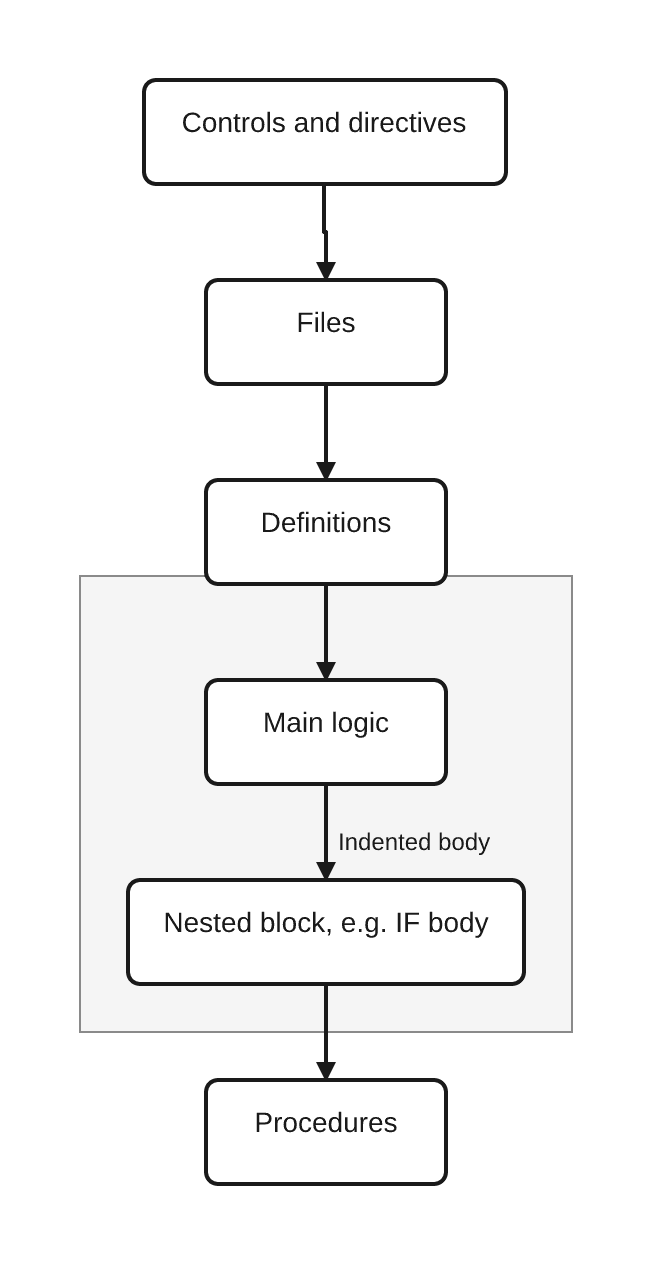
Not every member contains every region. A member with no file dependency can skip the files region entirely, and a short utility routine may have no procedures region at all. The regions describe a reading order, not a mandatory checklist, and a section comment does not create a compiler-level boundary; it only helps a human reader confirm where one region ends and the next begins.
This compact member shows four of the five regions, with the files region deliberately absent because the example performs no file I/O:
**free

// Controls and directives
ctl-opt dftactgrp(*no) actgrp(*caller);

// Definitions
dcl-s customerActive ind inz(*off);
dcl-s balanceDue packed(9:2) inz(0);
dcl-s action varchar(10);
dcl-s summary varchar(30);

// Main logic
customerActive = *on;
balanceDue = 0;

if customerActive and balanceDue = 0;
  action = 'PROCESS';
else;
  action = 'REVIEW';
endif;

summary = describeAction(action);
dsply summary;

*inlr = *on;
return;

// Procedures
dcl-proc describeAction;
  dcl-pi describeAction varchar(30);
    actionValue varchar(10) const;
  end-pi;

  if actionValue = 'PROCESS';
    return 'Ready to process';
  endif;
  return 'Needs review';
end-proc;
With customerActive = *ON and balanceDue = 0, action becomes PROCESS and summary becomes Ready to process. The section comments are restrained, one short label per region, not a banner around every statement. The blank line before each comment is what actually separates the regions for a human scanning the file; the comment text is a label for that separation, not the mechanism itself.
The complete file is stored at content/code/rpgle/article-058/readable-member-map.rpgle.
Indent Blocks to Expose Control Flow
Indentation is the fastest way to show a reader which statements belong to which block. Indent the body of an IF, SELECT/WHEN, loop, or MONITOR group one level deeper than the statement that opens it, and return to the opening level for the matching ELSE, WHEN, ENDSL, ENDDO, ENDFOR, or ON-ERROR. Peer branches, every WHEN in one SELECT, or the IF and its ELSE, should sit at the same indentation so a reader can match openers and closers by eye.
This is a readability aid, not an execution rule. RPG determines nesting by matching block keywords, IF with ENDIF, SELECT with ENDSL, and so on, not by column position in fully free-form source. Indentation communicates that nesting to a person faster than reading keyword by keyword; it does not change what the compiler runs.
Keep examples shallow when the point is layout rather than logic. The control-flow semantics of IF, SELECT, DOW, DOU, and FOR belong to RPGLE Calculation Specs and Logic Blocks; indicator-driven conditions inherited from legacy source belong to RPGLE Indicators and Status Flags. This lesson only asks that a nested block look nested.
Break Long Statements at Logical Boundaries
A long boolean condition, expression, call, parameter list, or declaration eventually needs to wrap. IBM’s free-form calculation statement documentation confirms that a statement may span multiple lines through ordinary continuation, as long as the statement still ends with its own semicolon.2 Given that room, wrap at a boundary that keeps meaning intact: before or after a logical operator such as and or or, between arguments in a parameter list, or between clauses of a condition. Do not split a name, a literal, or an operator across lines, and pick one wrapping style per statement rather than mixing them.
Make the continuation lines visually distinct from a nested block’s body. If block bodies are indented two spaces past their opener, indent a continuation further, so a reader can tell “this line is still part of the condition above it” from “this line is inside the block that condition opens.”
**free

dcl-s customerActive ind inz(*on);
dcl-s balanceDue packed(9:2) inz(0);
dcl-s loyaltyYears int(5) inz(6);
dcl-s orderCount int(5) inz(3);
dcl-s discountRate packed(5:4) inz(0);
dcl-s lineIndex int(5);
dcl-s action varchar(10);

if customerActive
     and balanceDue = 0
     and loyaltyYears >= 5;

  for lineIndex = 1 to orderCount;
    discountRate += 0.0100;
  endfor;

  action = 'PROCESS';
else;
  action = 'REVIEW';
endif;

dsply action;
The wrapped IF condition is indented five spaces, one step deeper than the if keyword itself, while the loop and assignment inside the block are indented two spaces. That difference is what keeps “still part of the condition” visually separate from “inside the block.” With customerActive = *ON, balanceDue = 0, loyaltyYears = 6, and orderCount = 3, the condition is true, the loop runs three times, discountRate reaches 0.0300, and action becomes PROCESS.
The file is stored at content/code/rpgle/article-058/nested-condition-continuation.rpgle.
Use Whitespace to Group Related Work
Treat a short run of closely related statements as one visual paragraph, and use a blank line where the responsibility actually changes, between setup and a decision, or between a decision and the action it triggers, rather than after every single statement. Two failure modes sit on either side of this: a wall of code with no separation at all forces a reader to parse every line to find a boundary, while a blank line after each statement fragments one coherent step into unrelated-looking pieces. Neither helps a reviewer see where setup ends and the real decision begins.
This grouping is an editorial habit, not a new language construct. SETUP, DECISION, ACTION, and similar labels are useful only as a way of thinking about which statements belong together; do not turn them into a formal section system RPG does not have.
Align Carefully, Not Mechanically
Local alignment can genuinely help. Lining up a short run of peer declarations or assignments so their names, types, or values sit in the same column makes it easy to compare them at a glance. That benefit shrinks fast once the aligned block gets long or gets edited often: adding one longer name to a wide alignment grid forces every other line in the group to shift, and the resulting diff obscures the one line that actually changed.
Prefer alignment that stays local and stable, a handful of adjacent, similar lines, over a file-wide column grid that has to be re-justified every time a name changes length. Neither extreme, “always align” or “never align anything,” is the right default; the tradeoff is between comparison ease and maintenance churn, and a small, local alignment usually wins that tradeoff while a wide one usually loses it.
Write Comments That Carry Information
A useful RPGLE comment explains something the statement itself does not: a business reason, a constraint on valid input, an unusual interface requirement, or why a normally-expected approach was rejected. A comment that only restates the next line, // set the action above action = 'PROCESS';, adds reading time without adding information, and it is one more line that can quietly go stale once the code beneath it changes.
Section labels, end-of-line remarks on one surprising line, and short TODO-style notes can all be useful under the same rule: write them when they carry information a careful reader could not get from the statement alone, and remove or update them the moment the code they describe changes. A comment that no longer matches the behavior it describes is a defect, not a harmless leftover.
Before and After: A Behavior-Preserving Readability Pass
This pair of excerpts shows a formatting-only pass. Every identifier, operation, expression, and the call sequence stay exactly the same between the two files; only whitespace, line breaks, indentation, spacing, and the comment change.
Before, valid but hard to scan:
**free

dcl-s customerActive ind inz(*on);
dcl-s balanceDue packed(9:2) inz(0);
dcl-s action varchar(10);
    if customerActive and balanceDue=0;
action='PROCESS';
    else;
          action='REVIEW';
    endif;
// set the action
dsply action;


*inlr=*on;
return;
After, same behavior, easier to review:
**free

dcl-s customerActive ind inz(*on);
dcl-s balanceDue packed(9:2) inz(0);
dcl-s action varchar(10);

// Active customers with a zero balance qualify for immediate processing.
if customerActive and balanceDue = 0;
  action = 'PROCESS';
else;
  action = 'REVIEW';
endif;

dsply action;

*inlr = *on;
return;
Change ledger, presentation only:
- Normalized the
IF/ELSE/ENDIFand assigned-action lines to a consistent two-space indent per nesting level, instead of four spaces, none, and ten spaces. - Normalized spacing around
=andandthroughout. - Replaced the redundant
// set the actioncomment, which only restated the next line, with a comment stating the business rule the condition implements. - Added one blank line between the declarations and the decision block, and between the decision block and the display statement; removed the extra blank line that had been sitting in front of program termination for no stated reason.
- Left every identifier, operation, expression order, and the call sequence unchanged.
Verification note: both files declare the same fields, follow the same IF/ELSE structure, and end with the same DSPLY and program-termination statements. For the shared input customerActive = *ON and balanceDue = 0, both are expected to set action = 'PROCESS' and display PROCESS. A syntax check or compile of both excerpts, followed by the same input case, is what actually confirms that presentation changed and behavior did not; reading the diff is not itself proof.
Both files are stored at content/code/rpgle/article-058/before-inconsistent-formatting.rpgle and content/code/rpgle/article-058/after-consistent-formatting.rpgle.
Working Safely with Legacy and Mixed-Form Source
Legacy and mixed-form source needs caution that fully free-form source does not. Before changing anything:
- Confirm the source form and any copied-member boundaries first; a member can mix fixed-format, column-limited free-form, and fully free-form regions.
- Preserve fixed-format columns and any sequence or source metadata your actual tooling depends on. Traditional specifications are position-dependent by definition, not by habit.3
- Format only the regions whose syntax genuinely permits the change you intend; do not run a whole-member reformat across a mixed-source file.
- Compile and test after any material maintenance edit. A formatting pass that looks safe is not proof of preserved behavior; the compile and the test are.
Legacy calculation semantics and indicator interpretation are not repeated here; see RPGLE Calculation Specs and Logic Blocks and, for indicator-driven conditions specifically, RPGLE Indicators and Status Flags for that maintenance context.
Turn Preferences into a Small Team Standard
A team standard is worth writing down only for the choices that otherwise cause recurring disagreement: indentation width, wrapping style, blank-line rhythm, comment expectations, section-label wording, and any documented exception for generated, copied, or fixed-format source. Keep the list short enough that people actually read it.
Apply the same rules in editor settings, in the examples the team circulates, and in code review, wherever your tooling can enforce them. Allow a documented exception for source you do not fully control, generated members, copied sections, or interface-constrained fixed-format regions, rather than pretending one rule fits every file in the repository. In most maintained units, consistency across the whole file matters more than any one author’s favorite spacing choice.
Readability Review Checklist
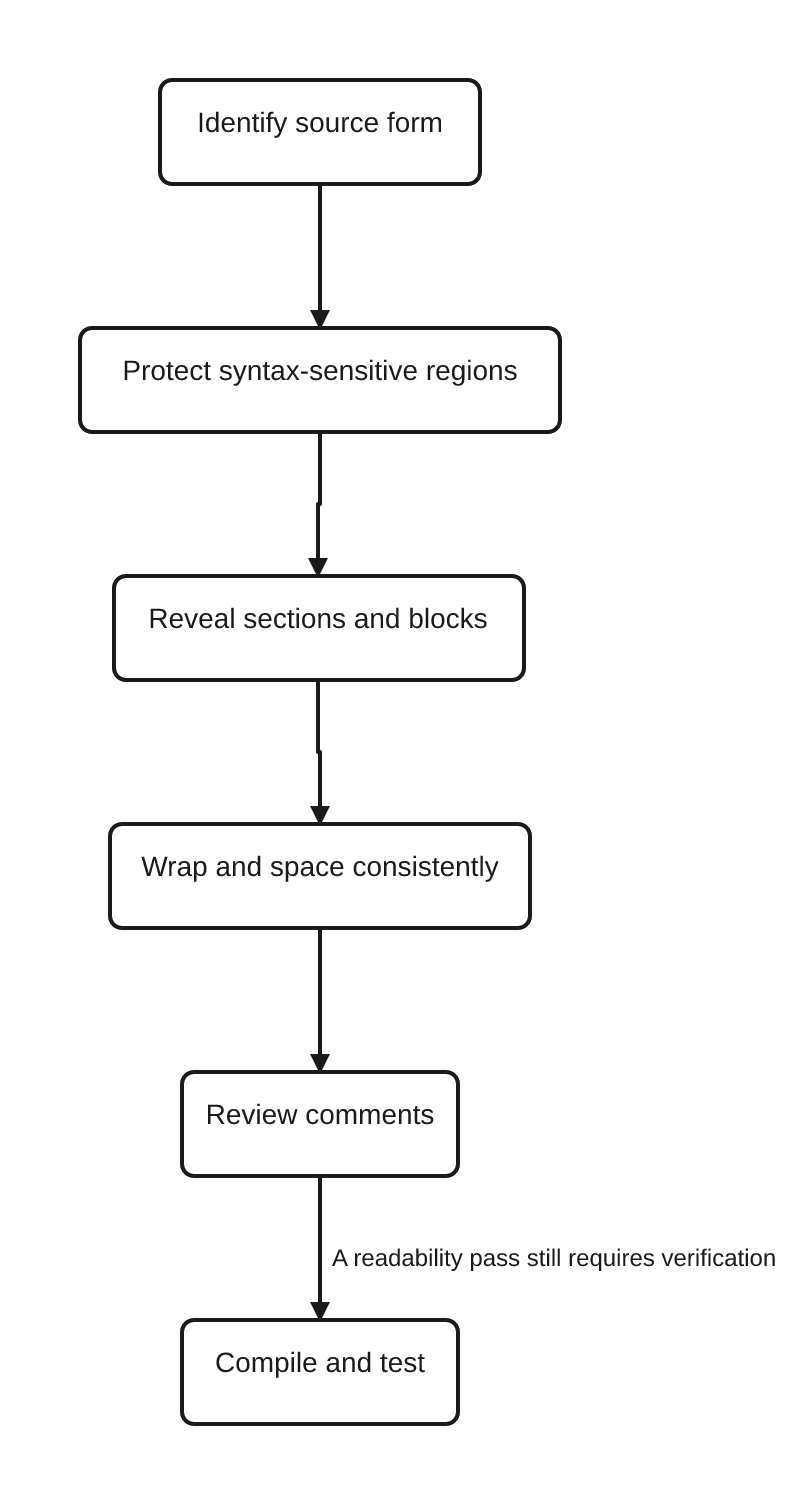
- Confirm the source form and any syntax-sensitive regions before changing whitespace.
- Locate sections and procedure boundaries at a glance.
- Match block openers, peers, and closers by their indentation.
- Check that every wrapped line still preserves its logical grouping.
- Remove redundant comments, and verify the remaining ones still match behavior.
- Distinguish a formatting suggestion from a refactoring request during review.
- Compile and run a proportionate test after any accepted change.
Common Mistakes
- Treating an indentation or whitespace preference as a universal IBM requirement.
- Treating fixed-format columns as cosmetic and running an unrestricted reformatter over legacy source.
- Assuming
**freealone makes a program readable. - Mixing several indentation or wrapping styles within one maintained member.
- Indenting a continuation line so heavily that it reads as a new nested block.
- Placing every operand or parameter on its own line even when the result is harder to scan than the original.
- Compressing an entire branch or loop onto one line to save vertical space.
- Adding a blank line after every statement and destroying the visual grouping that made the code scannable.
- Aligning a large region with padding that turns an unrelated one-line edit into a wide diff.
- Writing a comment that only restates the line beneath it.
- Leaving a comment in place after the behavior it describes has changed.
- Using section banners so large or so frequent that they overpower the source itself.
- Mixing renames, logic rewrites, or procedure extraction into a change presented as formatting-only.
- Assuming that cleaner formatting alone proves behavioral equivalence, without a compile and a test.
FAQ
What is a good RPGLE source layout?
One that makes a member’s regions, controls and directives, files, definitions, main logic, and procedures, easy to locate, indents nested blocks consistently, wraps long statements at logical boundaries, and uses comments that explain intent rather than restate syntax. The exact indentation width and wrapping style are team choices layered on top of that shared shape.
Does indentation affect RPGLE execution?
No. Fully free-form RPGLE determines block nesting by matching keywords such as IF and ENDIF, not by column position. Indentation helps a human reader see that nesting faster; it has no effect on what the compiler runs.
How should I indent fully free-form RPGLE?
Indent the body of each structured block one consistent step deeper than the statement that opens it, and return peer branches, and the matching closing keyword, to the opening level. RPG does not mandate a specific width; pick one and apply it consistently across the member.
How should long RPGLE statements be wrapped?
Wrap at a logical boundary, a boolean operator, an argument separator, or a clause boundary, using one continuation style per statement. Make the continuation indentation visibly different from ordinary block-body indentation so a reader can tell the two apart. Every wrap must remain legal free-form syntax for the statement’s documented termination rule.2
Can I reformat fixed-format RPGLE safely?
Only within regions whose syntax permits the change. Traditional specifications are position-dependent, so column positions carry meaning the compiler relies on.3 Confirm the source form first, and compile and test after any material change; do not run a whole-file reformatter over fixed-format or mixed-form source.
Where should comments go in RPGLE source?
Wherever they explain something the code alone does not, a business reason, a constraint, or a surprising exception. Free-form calculation statements permit an end-of-line comment after the terminating semicolon.2 Avoid comments that only restate the next statement, and remove or update a comment the moment the behavior it describes changes.
Is formatting the same as refactoring?
No. A formatting-only pass changes whitespace, line breaks, wrapping, and comments while preserving every identifier, operation, expression order, and call. Renaming a field, extracting a procedure, replacing an indicator, or changing an expression is a separately scoped behavioral change, even when it also happens to improve readability.
Key Takeaways
- Readable RPGLE makes the program’s real structure visible: syntax sets the boundaries, and consistent layout helps people see intent and flow.
- A small set of layout facts,
**freeplacement, free-form calculation statement termination, and fixed-format column positions, are compiler-required. Most of what makes source readable is a team convention layered on top of that. - A visible section map, consistent indentation, meaningful wrapping, restrained blank lines, and intent-focused comments all help a reviewer scan a member quickly.
- Local alignment can help; a wide, mechanical alignment grid usually costs more in maintenance churn than it returns in readability.
- Fixed-format and mixed-form source stays position-sensitive maintenance material. Confirm the source form, protect syntax-sensitive regions, and compile and test after any material change.
- A readability pass is not a refactor. Formatting can reveal existing logic; it cannot repair an unclear name, an overloaded routine, or incorrect behavior.
Continue Your Learning
- Previous: RPGLE Calculation Specs and Logic Blocks
- Current: RPGLE Source Layout and Readability
- Next: RPGLE Variables and Storage Types (ARTICLE-059, planned in the canonical RPGLE cluster)
- Adjacent maintenance context: RPGLE Indicators and Status Flags
- Return to: RPGLE for Beginners: A Practical IBM i Learning Path
ARTICLE-059 is the next lesson defined by the canonical cluster. It moves from presenting logic clearly to the variable and storage-type foundations that the data-and-definitions sequence builds on. Because it is not yet present in the publishing tracker, this article names it as a planned lesson rather than creating a public link.
IBM Evidence Used
This lesson uses IBM i 7.5 as its primary baseline for fully free-form statement and free-form calculation statement claims, and IBM i 7.4 for traditional fixed-format and compiler-directive references. It has no IBM i 7.6 dependency.
- IBM’s fully free-form statement reference supports
**freeplacement and the absence of a practical fully free-form line-length limit.1 - IBM’s free-form calculation statement reference supports semicolon termination, the end-of-line comment rule, and free continuation across lines.2
- IBM’s traditional syntax reference supports the position-dependent nature of fixed-format specifications.3
- IBM’s compiler-directives and specification-types references support the placement of top-of-source directives and the general ordering of source sections referenced from RPGLE Program Structure Explained.4 5
References
- Fully Free-Form Statements — IBM
- Free-Form Calculation Statement — IBM
- Traditional Syntax — IBM
- Compiler Directives — IBM
- RPG IV Specification Types — IBM