RPGLE indicators are small on/off fields that can record a result or decide whether another operation runs. In older RPG source, a number such as 42 may carry an important business decision across lines that are far apart. Reading that hidden state is an essential maintenance skill.
It is not, however, a model to copy blindly into new code. Modern fully free-form RPGLE usually makes business conditions visible through named indicator variables, direct expressions, structured IF/ELSE logic, built-in functions, and explicit error handling. Some indicators still belong at file, display, cycle, or external-interface boundaries, so modernization begins with understanding behavior rather than replacing every *INxx mechanically.
The previous lesson, RPGLE Calculation Specs and Logic Blocks, showed the conditioning and resulting-indicator areas around a traditional C-spec. This lesson follows those fields from the operation that produces a condition to the later calculation or output that consumes it. It retains the canonical intermediate classification while explaining the topic in beginner-friendly maintenance terms.
Estimated reading time: 11 to 14 minutes
Quick Summary
- An indicator holds an on/off state and may represent an operation result, a business condition, or RPG/file-related state.
- Numbered indicators can be referred to as data with names such as
*IN03,*IN42, and*IN99. - A conditioning indicator controls whether a traditional calculation or output operation runs.
- A resulting indicator reports a documented result of a traditional C-spec operation.
- “Status flag” is an umbrella phrase, not one uniform RPG construct. A business boolean,
%FOUND,%ERROR,%STATUS, and*INLRdo different jobs. - Modern RPGLE often uses named state, structured conditions, relevant built-in functions, and explicit status handling, but the correct mapping depends on the original behavior.
- Trace every producer, reset, test, and interface before changing an indicator.
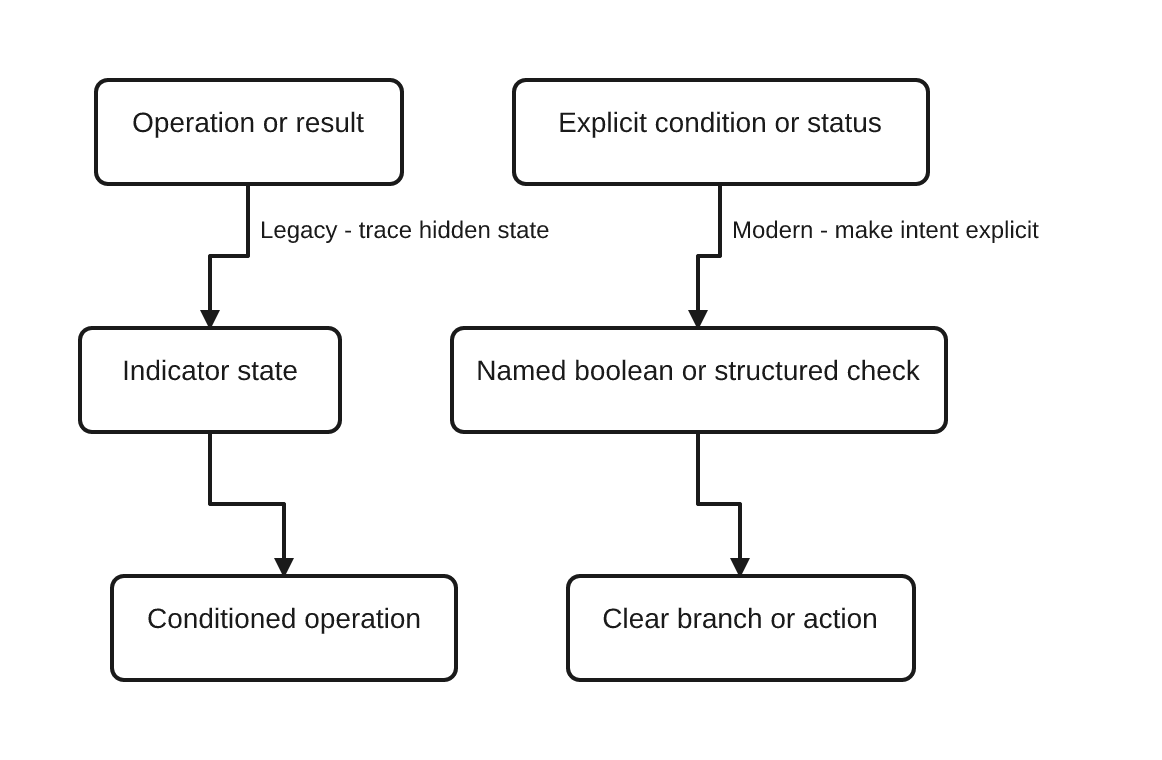
The legacy lane hides meaning behind a numbered state. The modern lane names or expresses the decision where a reader can understand it. That contrast is a design direction, not proof that every legacy indicator has a one-line replacement.
Reader Prerequisites
You should already recognize the main parts of an RPGLE program. RPGLE Program Structure Explained supplies that foundation, while RPGLE Specifications: Fixed, Free, and Fully Free explains why column position matters in older source.
You do not need to memorize every special indicator, status code, or fixed-format column. The useful skill is to recover what a particular state means in this program and when that meaning is valid.
Learning Outcomes
By the end of this lesson, you will be able to:
- explain what an RPG indicator represents;
- recognize numbered indicators in fixed positions and as
*INxxdata; - distinguish conditioning indicators from resulting indicators;
- separate business state, normal operation results, errors, detailed statuses, and interface state;
- trace an indicator from its producers to its consumers; and
- choose a clearer modern representation only after verifying behavior.
Why RPG Indicators Exist
IBM defines an RPG IV indicator as a one-byte character field containing 1 for on or 0 for off. It is generally used to report the result of an operation or to condition processing.1 In source, RPG programmers normally reason about those values as *ON and *OFF.
That simple mechanism solved two common needs:
- An operation could leave behind a compact result such as greater than, equal, no record found, end of file, or error.
- A later calculation or output line could run only when that result was on or off.
The important flow is therefore:
producer or event -> indicator state -> consumer
The producer is not always a calculation. RPG specifications can define overflow, record-identifying, control-level, field, and resulting indicators, and RPG itself defines other indicator behavior.2 Existing applications can also set numbered indicators directly or expose them through file and display interfaces.
This variety is why “indicator 42 is on” is only an observation. It does not yet tell you who set it, what it means, how long it stays valid, or whether another part of the program treats it differently.
Recognize Numbered Indicators and *INxx
Traditional RPG provides numbered indicators 01 through 99. When an indicator is referred to as data, the reserved form *INxx identifies the same numbered state: *IN42 refers to indicator 42. RPG also provides the *IN array and *IN(index) form for addressing numbered indicators as a group or by a calculated position.7
For example:
*in42 = *on;

if *in42;
  // Process the condition represented by indicator 42.
endif;
This syntax is supported, but the number does not communicate intent. A reader still has to discover whether 42 means “customer eligible,” “record missing,” “function key pressed,” or something else.
A modern program can use a named indicator-format variable when stored on/off state is genuinely needed:
dcl-s customerEligible ind inz(*off);
The name improves meaning. Scope and lifetime still matter: a broadly shared named variable can hide state almost as effectively as a numbered indicator.
Conditioning Indicators Decide When Work Runs
A conditioning indicator is an already-defined indicator tested to decide whether a traditional operation is processed. In fixed-format calculations, positions 9 through 11 can contain the condition. An N in the negative position means the operation is eligible when the indicator is off.5
This recognition excerpt assumes earlier analysis has established that indicator 42 means “customer eligible”:
      * Legacy fixed-format recognition excerpt only.
      * Indicator 42 was previously established as "customer eligible".
      * Preserve columns; do not use this as a new-code template.
     C   42              EVAL      Action = 'PROCESS'
     C  N42              EVAL      Action = 'REVIEW'
Read the first line as: when indicator 42 is on, set the action to PROCESS. Read N42 as: when indicator 42 is off, set the action to REVIEW.
Testing 42 does not reset it. IBM states that using an indicator as a conditioning indicator does not change its status; some definition, operation, program action, or interface must change that status.3
Traditional output specifications can also be conditioned by indicators. That connects this topic to RPGLE Input and Output Specifications Explained, but output-layout and display-file mechanics are outside this lesson.
The reusable recognition excerpt is stored at content/code/rpgle/article-057/legacy-indicator-conditioned-calculation.rpgle.
Resulting Indicators Report What an Operation Did
A resulting indicator is produced by a traditional calculation operation. The traditional C-spec layout places up to three two-character indicator entries in positions 71 through 76, but their meanings depend on the operation code and the position used.4
Depending on the operation, those positions may describe outcomes such as high, low, equal, found, no record found, EOF, or error. They are not generic slots with one universal meaning. The individual operation reference is the authority.
IBM documents resulting indicators as a traditional C-spec feature, not a free-form calculation-specification feature. It also notes that built-in functions can report the result for many operations.6 That supports a common modern direction, but it does not make one BIF a replacement for every result indicator.
A resulting indicator can later be used as a conditioning indicator. This creates the classic maintenance path:
operation produces indicator 42
        ... other lines may run ...
calculation conditioned by 42
output conditioned by N42
The distance between producer and consumers, plus possible resets or reuse, is what makes whole-program tracing necessary.
Status Flags Are Not One Uniform RPG Construct
“Status flag” is convenient reader language, but RPG does not provide one feature with that name and one lifetime. Separate these concepts before editing:
| Kind of state | Question it answers | Example modern representation |
|---|---|---|
| Business condition | Is this rule currently true? | customerEligible or a direct expression |
| Normal operation result | Did the relevant operation find data or reach EOF? | %FOUND(file) or %EOF(file) |
| Error occurrence | Did an eligible operation using error handling encounter an error? | %ERROR after an operation with extender E |
| Detailed status | Which recent program or file status was recorded? | %STATUS under its documented timing rules |
| Cycle or interface state | What does RPG, a file, display, or external contract require? | A special or boundary indicator that may need to remain |
IBM’s built-in-function reference lists %FOUND, %EOF, %ERROR, and %STATUS, but each has its own update rules.8
%FOUND is about a relevant search result
%FOUND returns on when the most recent relevant operation found a record, string match, or array element. Only documented operations update it. For file operations, a file parameter limits the question to the most recent relevant operation on that file.9
That makes this pattern clearer than an anonymous not-found indicator:
chain CustomerKey CustomerFile;

if %found(CustomerFile);
  lookupResult = 'FOUND';
else;
  lookupResult = 'MISSING';
endif;
Check it at the point where its context is obvious. Do not assume %FOUND permanently remembers one old lookup after other relevant operations run.
%EOF is about documented end or beginning of file state
%EOF is updated by specific read operations and subfile output behavior; some positioning and open operations affect only its file-qualified form under documented conditions.10 It is not a generic “nothing happened” flag and should not replace a no-record-found indicator unless the original operation actually has EOF semantics.
%ERROR and %STATUS answer different questions
%ERROR reports whether the most recent eligible operation coded with extender E ended in an error condition.11 %STATUS provides a more detailed recent program or file status value, and IBM cautions that it should be checked in the documented error-handling context rather than treated as timeless global state.12
ILE RPG also supports MONITOR groups, error subroutines, and default exception handling.13 Those mechanisms belong to a larger error-handling design. A MONITOR group is not a substitute for an ordinary business boolean, and a normal not-found result is not automatically an exception.
Trace Indicator-Based Logic Through a Program
When you encounter 42, do not rename it after reading one line. Build an evidence trail.
| Trace question | What to record |
|---|---|
| Identity | 42, *IN42, *IN(index), named indicator, or special/interface indicator |
| Producers | Result positions, SETON, SETOFF, assignments, input/file definitions, or external events |
| Resets | Explicit clearing plus operation-, cycle-, or interface-specific reset rules |
| Consumers | Positive and negative calculation conditions, output conditions, expressions, parameters, and interfaces |
| Timing | When the value becomes valid and what can overwrite it |
| Meaning | A precise sentence tied to this program and operation |
| Verification | Inputs and outcomes that prove both states and any separate error path |
Search for more than *IN42. In fixed-format source, the same state may appear as compact 42 or N42 entries. It may be set through a resulting-indicator position, SETON/SETOFF, *IN(index), an input specification, or an interface outside the calculation block.
The broader top-to-bottom reading method in How to Read an RPGLE Program From Top to Bottom helps locate the declarations and file/output areas that surround this indicator-specific trace.
Maintenance Example: Trace Indicator 42 End to End
Consider this deliberately small legacy excerpt:
      * Legacy fixed-format maintenance excerpt only.
      * CHAIN sets resulting indicator 42 on when no record is found.
      * Indicator 43 is the operation error indicator.
      * Preserve columns; verify the file definition and all consumers.
     C     CustomerKey   CHAIN     CustomerFile                       4243
     C   42              EVAL      LookupResult = 'MISSING'
     C  N42              EVAL      LookupResult = 'FOUND'
     C   43              EVAL      LookupResult = 'ERROR'
For traditional CHAIN, IBM assigns the first resulting-indicator position to no record found (NR) and the second to error (ER). It also documents %FOUND as the free-form way to obtain the found/not-found information.15
The trace is:
| Indicator | Producer | When it is consumed | Recovered meaning |
|---|---|---|---|
42 | CHAIN CustomerKey CustomerFile in the NR position | 42 selects MISSING; N42 selects FOUND | The lookup did not find the requested customer record |
43 | The same CHAIN in the ER position | 43 selects ERROR | The operation encountered a handled file error |
That table exposes an important distinction: indicator 42 describes a normal lookup outcome, while 43 describes an operation error. The conditions must not be collapsed into one vague “lookup failed” flag.
For a modern comparison, use the E extender and inspect the error result separately from the found result:
chain(e) CustomerKey CustomerFile;

if %error;
  lookupResult = 'ERROR';
elseif %found(CustomerFile);
  lookupResult = 'FOUND';
else;
  lookupResult = 'MISSING';
endif;
IBM permits either an error indicator or the E extender for an eligible operation, not both on the same operation.14 The modern excerpt uses E, checks %ERROR immediately, and then uses file-qualified %FOUND for the normal lookup outcome.
This is still not a universal conversion recipe. Before changing real code, verify the file definition, key type, locking behavior, all consumers, error recovery, and whether another operation can change the BIF result before it is tested. Cover three cases: record found, record not found, and operation error.
The excerpts are stored at content/code/rpgle/article-057/legacy-chain-indicator-trace.rpgle and content/code/rpgle/article-057/modern-chain-status-check.rpgle.
Map Legacy Responsibilities to Modern RPGLE
Use the following as a decision table, not an automatic converter:
| Legacy pattern | Meaning to recover | Modern direction | What must be verified |
|---|---|---|---|
| Numbered business-state indicator | A rule that stays true or false for some period | Named indicator variable or direct expression | Every setter, reset, consumer, scope, and expected lifetime |
| Indicator-conditioned operation | Run work only under a condition | Structured IF/ELSEIF/ELSE | Positive or negative sense, compound conditions, order, and side effects |
| Comparison feeding HI/LO/EQ indicators | Compare values and choose later work | Direct comparison or SELECT | Types, comparison rules, required outcomes, and persistence |
| No-record-found indicator | Report one lookup result | Immediate %FOUND(file) check | Exact operation, file, timing, and separate error path |
| EOF indicator | Report end/beginning-of-file state | %EOF(file) where documented | Which operation updates it and correct loop/read order |
| Error indicator | Handle an eligible operation error | Extender E with %ERROR/%STATUS, or structured exception handling | Caught errors, status timing, recovery, and control flow |
| Shared indicator group | Carry state across distant logic or an interface | Named fields, parameters, return values, or a bounded procedure | Aliases, callers, global state, file/DDS layout, and external contracts |
Prefer a direct condition when no stored state is needed
If eligibility is used once, the clearest source may be:
if customerActive and balanceDue = 0;
  action = 'PROCESS';
else;
  action = 'REVIEW';
endif;
Use a named indicator when the state has a real lifetime
If several nearby statements need the same derived fact, calculate a named state explicitly:
dcl-s customerEligible ind inz(*off);

customerEligible = customerActive and balanceDue = 0;

if customerEligible;
  action = 'PROCESS';
else;
  action = 'REVIEW';
endif;
With customerActive = *ON and balanceDue = 0, the expected outcome is customerEligible = *ON and action = 'PROCESS'. With either condition false, the action is REVIEW.
The complete self-contained sample is at content/code/rpgle/article-057/modern-named-boolean-condition.rpgle.
Use clearer modular boundaries when state crosses responsibilities
When one group of logic determines eligibility and another applies it, a procedure can make inputs and outputs explicit. That may mean returning an indicator value, returning a richer status, or accepting a named parameter. It does not mean wrapping every *INxx in a procedure.
First check shared fields, calls, early exits, file effects, error handling, and external interfaces. Only then decide whether the state belongs in a local expression, a named variable, a return value, or a retained boundary mapping.
Why Indicator-Heavy Programs Are Hard to Maintain
An indicator’s storage is simple; its meaning can be scattered.
- Anonymous identity:
42says where the state lives, not what it means. - Distant producers and consumers: the setting operation may be many lines or subroutines away from the test.
- Negative conditions:
N42adds an inversion that is easy to overlook. - Reuse: one indicator may be assigned in several contexts, making a single informal name misleading.
- Hidden lifetime: the state may persist until an explicit reset or until an operation, cycle step, or interface changes it.
- Mixed outcomes: not-found, EOF, error, and business rejection can look alike if every path is reduced to an unexplained number.
- External boundaries: display files, indicator areas, or other interfaces may give a numbered position contractual meaning outside the visible calculation logic.
Named variables and structured flow reduce these problems when they narrow scope and expose intent. They do not solve them if the new variable remains global, mutable, and poorly traced.
Common Beginner Mistakes
- Assuming
*IN42has a standard business meaning. Its meaning comes from this program’s producers and consumers. - Reading only the operation code. A traditional line may also be conditioned by earlier state or produce new indicator state.
- Assuming a test clears the indicator. Conditioning does not itself change the status.
- Searching only for
*IN42. Fixed positions may contain42orN42, and array or interface access can reach the same state. - Confusing not-found with error. A missing key can be an expected result; an operation exception needs a separate handling decision.
- Treating all BIFs as generic flags.
%FOUND,%EOF,%ERROR, and%STATUShave different producers and timing rules. - Checking a BIF too late. Another relevant operation may have changed the result being queried.
- Replacing a number with a name and stopping. A named variable with uncontrolled lifetime is still hidden mutable state.
- Removing interface-bound indicators. Preserve or adapt the boundary until its file, DDS, or external contract is understood.
- Calling all indicators obsolete. Indicator-heavy business logic is not the preferred modern style, but supported indicator mechanisms still have real uses.
A Practical Indicator-Maintenance Workflow
Use this sequence before changing indicator-driven code:
- Identify the source and boundary. Confirm fixed, column-limited free-form, fully free-form, or mixed source. Locate the program, procedure, subroutine, and file/display boundaries.
- Record every representation. Note compact indicator fields,
*INxx,*IN(index), named indicator variables, and special or interface indicators. - Find all producers. Check result positions,
SETON/SETOFF, assignments, input/file definitions, cycle behavior, and external events. - Find all consumers. Check positive and negative calculation conditions, output conditions, expressions, parameters, and interfaces.
- Establish timing. Determine initialization, reset rules, overwrites, and how long each consumer assumes the value remains valid.
- Write the meaning in plain language. Prefer “the last CHAIN against CustomerFile did not find this key” over “42 is on.”
- Separate outcomes. List success, expected not-found or EOF, business rejection, and exception/error independently.
- Open the exact IBM reference. Verify result positions, extenders, BIF update rules, status timing, and restrictions for the operation.
- Choose the narrowest clear representation. A direct condition, named indicator, documented BIF, structured error handler, procedure result, or retained interface indicator may be correct.
- Test before and after. Cover both on/off paths, repeated-operation timing, and every relevant error or boundary case.
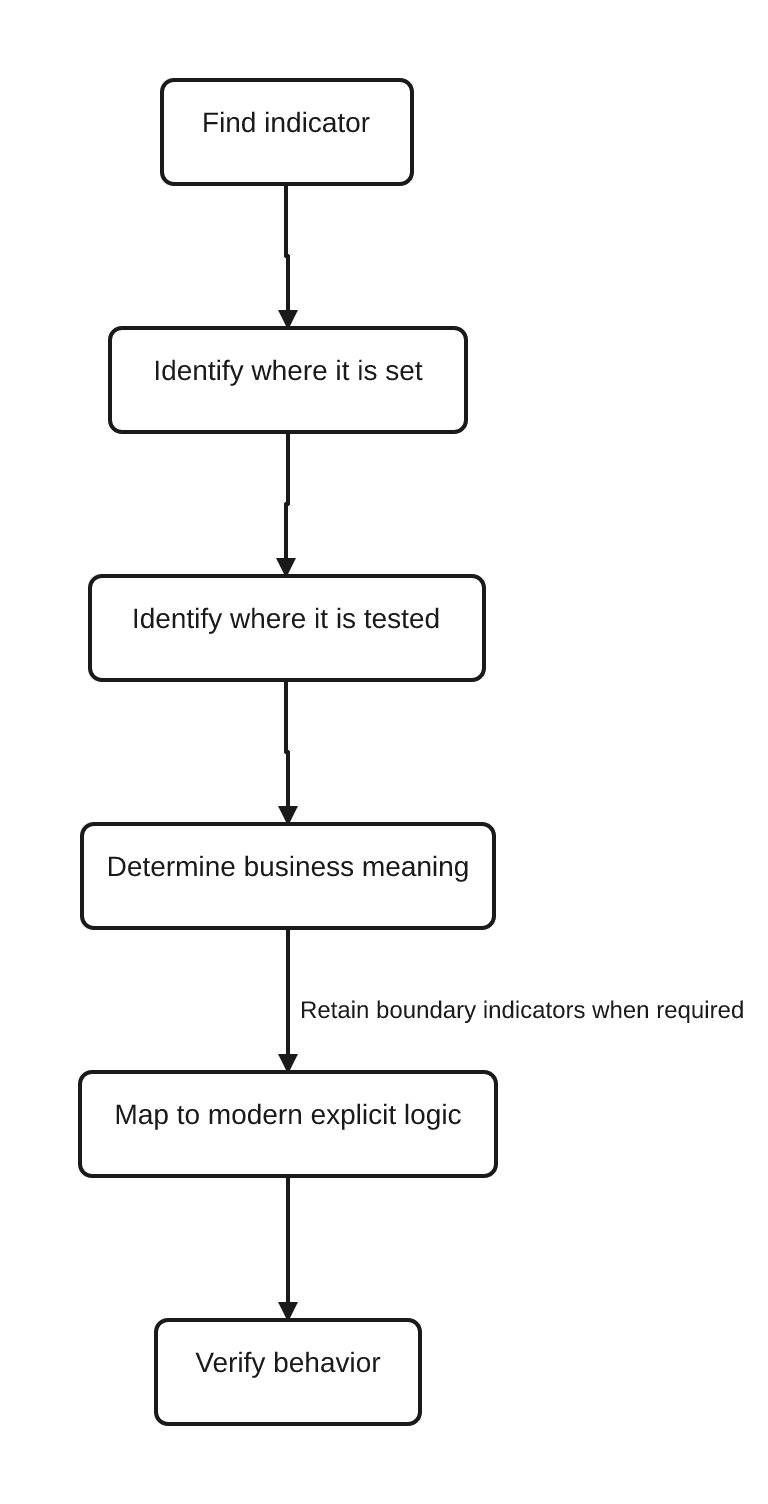
The verification step is not optional. An apparently cleaner rewrite is a regression if it changes the original branch sense, state lifetime, file outcome, or error path.
FAQ
What is an indicator in RPGLE?
An indicator is an on/off field that can represent a condition, report an operation result, or control whether processing occurs. The mechanism is simple, but its meaning and reset behavior depend on how the program defines and uses it.
What does *INxx mean in RPGLE?
*INxx refers to a numbered RPG indicator as data, where xx is the two-digit indicator number. For example, *IN42 refers to indicator 42. The number identifies storage; it does not provide a universal business meaning.
What is the difference between a conditioning and resulting indicator?
A conditioning indicator is tested to decide whether an operation runs. A resulting indicator is set according to the documented outcome of a traditional C-spec operation. A resulting indicator can later be consumed as a conditioning indicator.
Are RPGLE indicators obsolete?
No. They remain supported and can be relevant in legacy code, special RPG behavior, or file/display/external interfaces. For new business logic, descriptive variables, direct conditions, built-in functions, and structured error handling are usually clearer than many shared numbered indicators.
Why are numbered indicators difficult to maintain?
The number does not name the business condition, and producers, resets, and consumers may be far apart. Negative tests, reuse, operation-specific behavior, and interfaces can make the true lifetime hard to see.
Should I replace an indicator with a named boolean?
Only after tracing its complete behavior. A named indicator variable is useful for genuine stored business state, but a direct expression or operation-specific BIF may be better. An interface-bound indicator may need to remain.
When should I use %FOUND, %EOF, %ERROR, or %STATUS?
Use the function that matches the documented result you need and check it in the correct operation context. %FOUND reports relevant found results, %EOF reports documented file-end conditions, %ERROR reports an eligible E-extender operation error, and %STATUS provides more detailed recent status information.
Key Takeaways
- RPG indicators hold on/off state that can report results or condition processing.
*INxxnames a numbered indicator as data; it does not reveal the indicator’s business meaning.- Conditioning indicators consume state, while resulting indicators produce operation-specific state in traditional C-specs.
- “Status flags” covers several different concepts. Business booleans, found/EOF results, error occurrence, detailed status, and interface state must remain distinct.
- Modern fully free-form RPGLE usually favors direct expressions, named indicator variables, structured branches, relevant BIFs, explicit error handling, and clear procedure interfaces.
- Some indicators remain necessary or useful at legacy, file, display, cycle, or external boundaries.
- Safe modernization traces every producer and consumer, recovers meaning, checks IBM’s exact operation rules, and verifies behavior with focused tests.
Continue Your Learning
- Previous: RPGLE Calculation Specs and Logic Blocks
- Current: RPGLE Indicators and Status Flags
- Next: RPGLE Source Layout and Readability (ARTICLE-058, planned in the canonical RPGLE cluster)
- Later: RPGLE Variables and Storage Types (ARTICLE-059, planned)
- Return to: RPGLE for Beginners: A Practical IBM i Learning Path
ARTICLE-058 is the next lesson defined by the canonical cluster. It turns from hidden state to the broader layout and readability choices that help maintainers make logic easier to scan. Because it is not yet present in the publishing tracker, this article names it as a planned lesson rather than creating a public link.
IBM Evidence Used
This lesson uses IBM i 7.4 as its primary evidence baseline and IBM i 7.5 for the clearest applicable EOF and program-status references. It has no IBM i 7.6 dependency.
- IBM’s indicator references support the indicator data model, specification-defined categories, conditioning behavior, and numbered-indicator data rules.1 2 3 7
- IBM’s traditional calculation references support the conditioning and resulting positions and the operation-dependent nature of resulting indicators.4 5 6
- IBM’s BIF and status references support the distinctions among found, EOF, error occurrence, and detailed status.8 9 10 11 12
- IBM’s exception and
CHAINreferences support the example’s separate not-found and error paths and the choice between an error indicator and theEextender.13 14 15
IBM, “Indicators Defined on RPG IV Specifications,” IBM i 7.4 documentation. ↩↩
IBM, “%FOUND (Return Found Condition),” IBM i 7.4 documentation. ↩↩
IBM, “%EOF (Return End or Beginning of File Condition),” IBM i 7.5 documentation. ↩↩
IBM, “%ERROR (Return Error Condition),” IBM i 7.4 documentation. ↩↩
IBM, “ILE RPG Exception Handling,” IBM i 7.4 documentation. ↩↩
IBM, “Specifying Error Indicators or the ‘E’ Operation Code Extender,” IBM i 7.4 documentation. ↩↩
IBM, “CHAIN (Random Retrieval from a File),” IBM i 7.4 documentation. ↩↩
References
- RPG IV Indicators — IBM
- Indicators Defined on RPG IV Specifications — IBM
- Additional Rules — IBM
- Positions 9-11 — IBM
- Using Indicators — IBM
- Traditional Syntax — IBM
- Resulting Indicators — IBM
- Built-in Functions — IBM
- %FOUND (Return Found Condition) — IBM
- %EOF (Return End or Beginning of File Condition) — IBM
- %ERROR (Return Error Condition) — IBM
- Program Status Codes — IBM
- ILE RPG Exception Handling — IBM
- CHAIN (Random Retrieval from a File) — IBM
- Specifying Error Indicators or the 'E' Operation Code Extender — IBM