Grow the Collection Without Guessing Its Final Size
A program may know the largest collection it will accept without knowing how many elements it will actually need. RPGLE varying dimension arrays address that difference: the declaration sets a maximum, while the current number of elements can change during execution.1
This tutorial focuses on collection growth, not basic array declarations or a general catalog of array functions. If subscripts and ordinary DIM declarations are still unfamiliar, read RPGLE Arrays and Tables first. For the broader study sequence, return to the RPGLE learning path.
The examples target IBM i 7.5 documentation. IBM also documents these varying-dimension forms and %ELEM behavior for IBM i 7.4.34
Estimated reading time: 7 minutes
Quick Summary
DIM(*VAR:maximum)gives you explicit control over the current dimension.DIM(*AUTO:maximum)allows the array to grow automatically when an assignment requires a higher element.%ELEM(array)returns the current dimension.%ELEM(array : *MAX)returns the declared maximum dimension.- For an explicit append, check the maximum, increase the current dimension, then assign the new element.12
A useful design rule is to distinguish elements that currently exist from elements your program has populated with meaningful data. In the append pattern below, every new element is assigned immediately, so those counts stay aligned.
Understand Current Dimension Versus Maximum Dimension
Consider this declaration:
dcl-s values int(10) dim(*var:5);
The 5 is the maximum dimension, not the initial number of elements. This varying-dimension array starts with a current dimension of zero. Assigning to %ELEM(values) changes that current dimension, within the declared maximum.12
| Expression | Meaning in this example |
|---|---|
%ELEM(values) | Current number of elements |
%ELEM(values : *MAX) | Maximum number of elements: 5 |
%ELEM(values) = 3 | Set the current dimension to 3 |
These are dimension measurements. Do not use them as measurements of bytes allocated or as evidence of a particular memory-allocation strategy.2
For a *VAR array, make an element part of the current dimension before assigning to it. The declared maximum alone does not make every subscript available for normal element access.1
Choose Explicit or Automatic Growth
The two varying-dimension forms differ in who initiates growth.1
| Declaration | Growth approach | Suggested use |
|---|---|---|
DIM(*VAR:5) | Your code changes the current dimension with %ELEM | A collection with a clear validation-and-append step |
DIM(*AUTO:5) | An assignment to a higher element can grow the current dimension automatically | A collection where assignment naturally controls growth |
Explicit growth with *VAR
dcl-s manualValues int(10) dim(*var:5);

%elem(manualValues) = 1;
manualValues(1) = 10;
Here, the dimension change is a separate operation that precedes the element assignment.2
Automatic growth with *AUTO
dcl-s automaticValues int(10) dim(*auto:5);

automaticValues(1) = 10;
For this assignment, *AUTO grows the current dimension to include element 1. The declared maximum still applies; automatic growth does not mean an unlimited collection.1
For a sequential collection, prefer adding at the next position rather than jumping to a distant subscript. That keeps the relationship between current dimension and populated elements easy to follow.
The rest of this lesson uses *VAR so the growth decision remains visible.
Build a Guarded Append
Our example accepts up to five integers. It generates seven candidate values, appends the first five, and counts the remaining two as rejected.
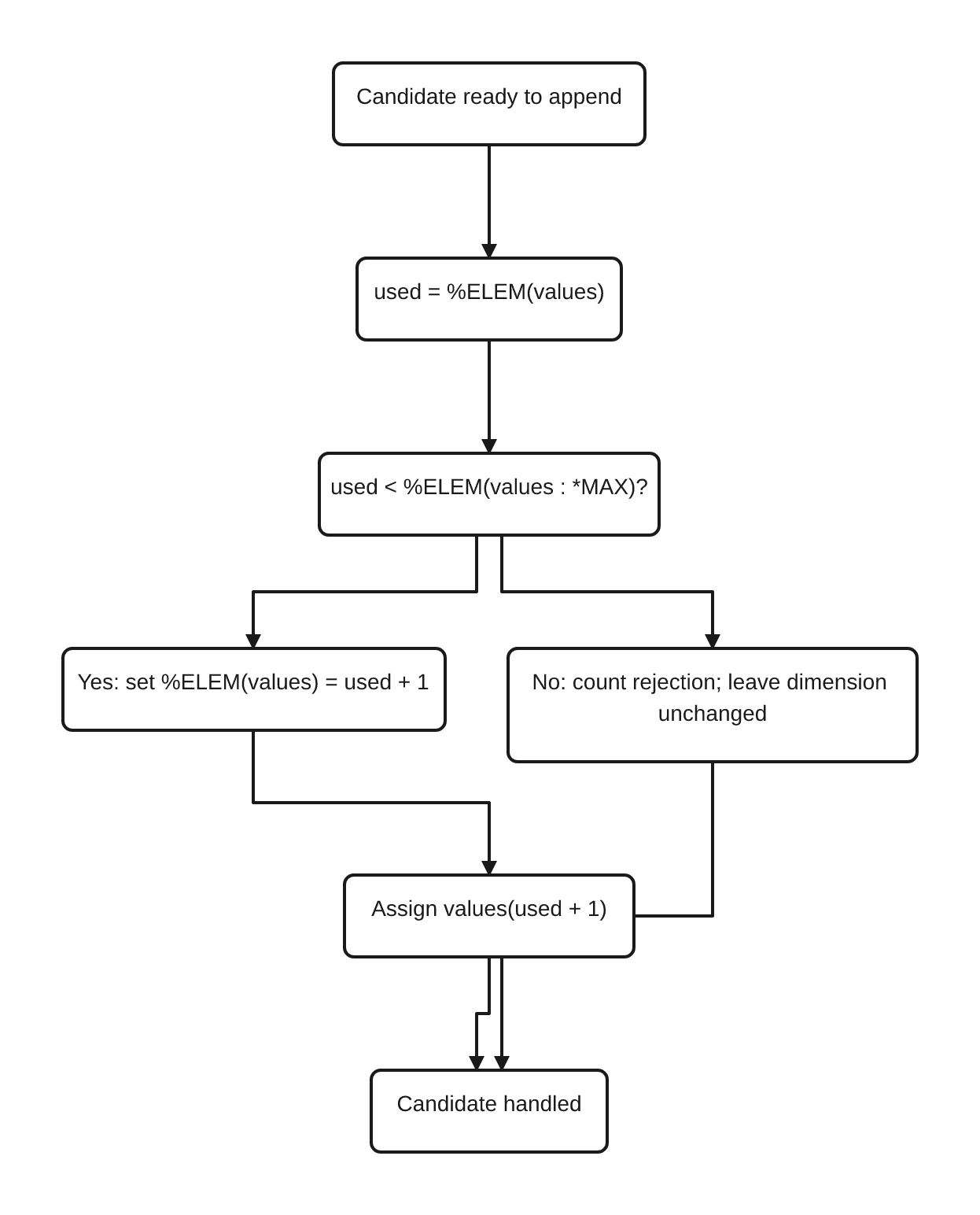
The append follows three steps:
- Read the current dimension.
- Check that it is below the maximum.
- Increase the dimension by one and assign that new element.
The guard is an application policy: this example rejects excess candidates. A different application could report an error or process the collection in batches. What matters here is making that decision before requesting growth beyond the maximum.
**free
ctl-opt dftactgrp(*no);

dcl-s values int(10) dim(*var:5);
dcl-s candidate int(10);
dcl-s used int(10) inz(0);
dcl-s rejected int(10) inz(0);
dcl-s position int(10);
dcl-s total int(10) inz(0);

for candidate = 1 to 7;
   used = %elem(values);

   if used < %elem(values : *max);
      %elem(values) = used + 1;
      values(used + 1) = candidate * 10;
   else;
      rejected += 1;
   endif;
endfor;

used = %elem(values);

for position = 1 to used;
   total += values(position);
endfor;

dsply used;
dsply rejected;
dsply total;

*inlr = *on;
return;
The dimension query, maximum query, and assignment to %ELEM follow IBM’s documented varying-dimension operations.2
Validation status: documentation-reviewed; not compiled or run on IBM i in this workspace.
Trace the append
| Candidate value | Current dimension before check | Decision | Current dimension afterward |
|---|---|---|---|
| 10 | 0 | Grow and assign | 1 |
| 20 | 1 | Grow and assign | 2 |
| 30 | 2 | Grow and assign | 3 |
| 40 | 3 | Grow and assign | 4 |
| 50 | 4 | Grow and assign | 5 |
| 60 | 5 | Reject | 5 |
| 70 | 5 | Reject | 5 |
The expected values passed to the three DSPLY operations are:
used: 5rejected: 2total: 150
These are expected results derived from the example, not output captured from an IBM i run.
Why use the current dimension as the append position?
Immediately before each append, used receives %ELEM(values). The code then creates element used + 1 and assigns it.
This avoids maintaining a separate, persistent collection count that could drift away from the actual dimension. used is only a local snapshot for that operation.
Why does the final loop stop at used?
The loop processes the current collection, not every position permitted by its maximum. %ELEM(values) reports that current dimension.2
In this particular run the collection becomes full. If you change the candidate loop to stop at three, the same final loop processes only three elements.
Keep the Growth Boundary in One Place
When adapting the pattern, keep these operations together:
used = %elem(values);

if used < %elem(values : *max);
   %elem(values) = used + 1;
   values(used + 1) = candidate * 10;
else;
   rejected += 1;
endif;
Validate a candidate before this block if it might be unsuitable for the collection. Then grow and assign as one small, readable step.
Avoid these mistakes:
- Treating the maximum as the current dimension. Use
%ELEM(values)for the current collection and%ELEM(values : *MAX)for its limit.2 - Writing a new
*VARelement before growing the array. Explicitly increase its dimension first.12 - Assuming
*AUTOremoves the need for a limit policy. It changes how growth happens, not the declared maximum.1 - Growing before deciding whether to accept a candidate. In this design, that would make the dimension a poor measure of accepted values.
- Claiming a performance advantage without measuring it. Choose the clearer growth model first, then benchmark representative workloads if performance matters.
Check the Boundary Cases on Your System
Use the supplied source as a starting point for local verification.
| Test | Change | Expected result |
|---|---|---|
| Empty collection | Skip the candidate-generation loop | Used 0, rejected 0, total 0 |
| Below the maximum | Generate candidates 1 through 3 | Used 3, rejected 0, total 60 |
| Exactly full | Generate candidates 1 through 5 | Used 5, rejected 0, total 150 |
| Beyond the maximum | Keep candidates 1 through 7 | Used 5, rejected 2, total 150 |
Review the compiler listing and verify these values on your target IBM i system before using the pattern in production. The accompanying README includes a sample compile command and the validation limitation.
Continue the Array Learning Path
The central distinction is simple: the maximum is a limit; the current dimension is the collection’s present size. Choose *VAR when you want a visible resize step, or *AUTO when assignment should drive growth.12
Next, follow the shape of your data:
- Read RPGLE Data Structures for Related Fields when each collected item needs several related fields.
- Read RPGLE Built-In Functions for Lists and Arrays for the next lesson on working with collections.
Sources
Related Reading
- RPGLE for Beginners: A Practical IBM i Learning Path (
ARTICLE-046) - RPGLE Arrays and Tables (
ARTICLE-072) - RPGLE for Beginners: A Practical IBM i Learning Path (
ARTICLE-046)
References