Many business tasks repeat a known number of times: print five labels, inspect positions 1 through 10, or process a fixed batch of work. A counted RPGLE DO group expresses that repetition without copying the same statements. The operation establishes a numeric index and limit; ENDDO closes the controlled group and participates in moving the repetition to its next iteration.12
This tutorial focuses on that counted form. It does not teach condition-controlled DOU or DOW groups, which have their own articles and different stopping questions.
Quick Summary
- Write a counted group as
do startValue to limitValue indexName; ... enddo;.12 - The start and limit describe an inclusive range in the normal increasing case:
1through5produces five iterations, including both endpoints.1 - The index is initialized when RPG enters the
DOoperation. The body runs only while the counted range permits another iteration.1 ENDDOmarks the end of the group. After the body, RPG advances the index and determines whether the group repeats.2- Use a counted
DOwhen the range or repetition count is known. UseDOWorDOUwhen a business condition, rather than a numeric range, governs repetition. - Calculate the expected first value, last value, and iteration count before trusting a loop boundary.
- Keep the index change under the loop structure’s control. Changing it inside the body makes the range harder to reason about.
Reader Prerequisites
You should already recognize a controlled block and a simple condition from RPGLE IF, ELSE, and ELSEIF Decisions (ARTICLE-064). This tutorial uses IF only to label the first and last iteration; ARTICLE-064 owns decision syntax.
The wider learning sequence is collected in RPGLE for Beginners: A Practical IBM i Learning Path (ARTICLE-046).
Learning Outcomes
After reading, you should be able to:
- Identify the initial value, inclusive limit, index, body, and
ENDDOin a counted group. - Trace the index value through each iteration.
- Predict the first value, final value, and number of executions for a simple increasing range.
- Recognize common off-by-one and accidental-repetition mistakes.
- Choose counted
DOonly when a numeric range actually matches the problem.
Why Programs Need Repetition
Without a loop, five similar actions often become five copied statements. Copying hides the rule: a reader sees repeated code but must infer why it repeats and how many copies are intended. It also makes change risky because one copy can be missed.
A loop separates two ideas:
- Control: which iteration is current and when repetition finishes.
- Work: what the program does during one iteration.
For a fixed range, DO makes the control explicit. The body describes one unit of work; the loop structure applies it to every index value in the range.
Anatomy of an RPGLE DO Loop
Here is the smallest complete counted example:
dcl-s loopCounter int(10);

do 1 to 5 loopCounter;
  dsply ('Iteration ' + %char(loopCounter));
enddo;
The parts have distinct responsibilities:
| Part | Example | Responsibility |
|---|---|---|
| Initial value | 1 | Value assigned to the index at loop entry |
| Limit | 5 | Inclusive upper boundary for this increasing range |
| Index | loopCounter | Current position, available to the body |
| Body | dsply ... | Work performed once per iteration |
| Terminator | enddo; | Closes the group and leads into progression/repetition |
IBM documents DO as the beginning of a group and ENDDO as its matching end operation.12 The names above the syntax, and the recommendation to give an index a descriptive name, are teaching and readability guidance.
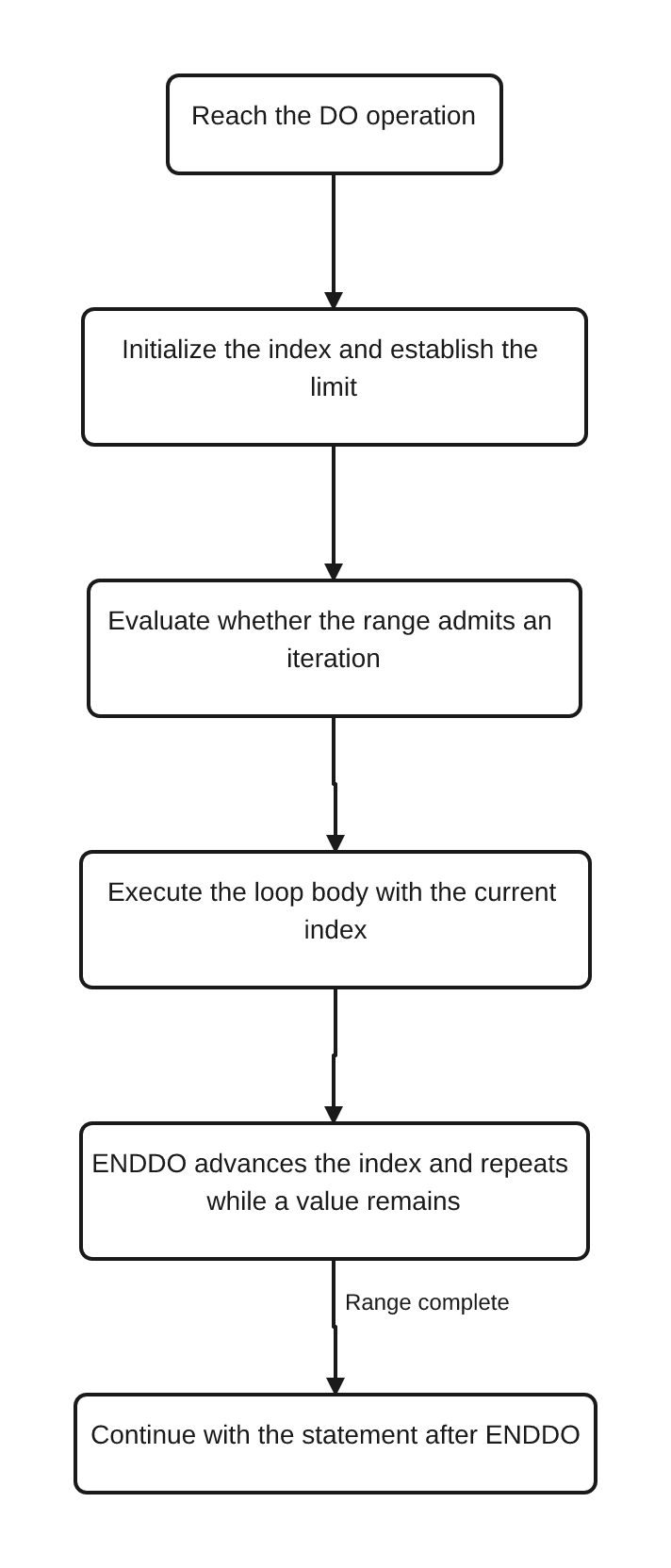
How the Loop Progresses
Trace do 1 to 3 loopCounter; one state at a time:
| Moment | loopCounter | What happens |
|---|---|---|
Enter DO | 1 | Initialize the index and admit the first iteration |
| First body execution | 1 | Perform the work for position 1 |
After first ENDDO | 2 | Advance and repeat |
| Second body execution | 2 | Perform the work for position 2 |
After second ENDDO | 3 | Advance and repeat |
| Third body execution | 3 | Perform the work for position 3 |
After third ENDDO | 4 | The inclusive limit has been passed; continue after the group |
The key is that the body sees the current index, not the next one. The final admitted value is 3; 4 is the value reached while determining that no further body execution belongs to this range.12
This is conceptual source-level behavior. The diagram and trace do not claim anything about compiler internals or generated machine instructions.
Counted Repetition Example
basic-do-loop.rpgle displays five numbered iteration messages:
do 1 to repetitionLimit loopCounter;
  dsply ('Iteration ' + %char(loopCounter));
enddo;
The repetition limit is stored in a named variable, which makes the boundary easy to find. With repetitionLimit initialized to 5, the intended messages are numbered 1, 2, 3, 4, and 5. That is five body executions, not four and not six.
Understanding the First and Last Iteration
For a simple increasing range with a step of one:
iteration count = limit - start + 1
The + 1 matters because both endpoints are included. A range from 3 through 5 contains 3, 4, and 5:
5 - 3 + 1 = 3 iterations
loop-boundaries.rpgle makes those endpoints visible:
do firstPosition to lastPosition currentPosition;
  if currentPosition = firstPosition;
    dsply 'first-iteration';
  endif;

  dsply ('Position ' + %char(currentPosition));

  if currentPosition = lastPosition;
    dsply 'last-iteration';
  endif;
enddo;
The IF statements do not control whether the loop repeats. They simply identify the endpoints while the counted DO owns progression.
Common Off-by-One Mistakes
An off-by-one error means the loop executes one time too many or one time too few. Inclusive limits are a common source of that mistake.
Treating the limit as exclusive. If the intended positions are 1 through 10, do 1 to 10 position; already includes position 10. Increasing the limit to 11 adds an unwanted iteration.
Using a count as though it were the final index. Starting at zero changes the arithmetic. do 0 to 5 index; represents six values: 0, 1, 2, 3, 4, and 5.
Confusing a quantity with a position. A variable named itemCount describes how many items exist; itemPosition describes the current place. Distinguishing them reduces the chance of using the wrong value as the index or boundary.
Before finalizing a loop, write down three expected facts:
- What value should the body see first?
- What value should it see last?
- How many times should it run?
Then trace a small boundary case by hand. A range of 3 through 5 is much easier to inspect than a production range of 1 through 10,000, but it tests the same inclusive rule.
Keeping Loop Logic Readable
The following are editorial recommendations, not compiler requirements:
- Name the index for what it represents (
invoiceNumber,labelNumber,attemptNumber) instead of using a single letter in business code. - Name the limit when it carries business meaning, and keep it stable while the group runs.
- Keep the body focused on one unit of work. Extract larger work into a procedure when details obscure the progression.
- Avoid assigning a new value to the loop index inside the body. Let the
DOgroup express progression in one place. - Do not hide a second repetition mechanism inside the body unless nesting is genuinely part of the problem.
- Keep
DOandENDDOvertically obvious through consistent indentation.
IBM defines what the operations do.12 These naming, size, and layout choices are maintainability guidance from this tutorial.
Worked Examples
readable-loop-processing.rpgle models a small fixed invoice batch. The loop index identifies the current invoice, while the body updates two business totals:
do 1 to invoicesToProcess invoiceNumber;
  processedCount += 1;
  totalFees += feePerInvoice;

  dsply ('Processed invoice ' + %char(invoiceNumber));
enddo;
With four invoices and a fee of 2.50 per invoice, the intended final values are:
| Value | Expected result |
|---|---|
processedCount | 4 |
totalFees | 10.00 |
The example is deliberately small. Its purpose is to show that loop control and business work can remain separate: DO owns which invoice number is current, while the body owns the processing totals.
All three members in this tutorial are documentation-reviewed; not compiled or run on IBM i in this workspace. Their observations are derived from initialized values and documented operation behavior, not captured runtime output.
Common Mistakes
Copying work instead of looping. Repeated statements conceal the range and make later updates inconsistent.
Choosing DO when the count is not known. A fixed numeric limit is a poor substitute for a changing business condition. Use the condition-controlled form that matches the question instead.
Changing the index in the body. The loop already advances its index. A second assignment can skip work, duplicate work, or make completion difficult to predict.
Changing the limit during processing. Even where an expression is legal, a moving boundary makes the number of iterations difficult to verify. Capture or calculate a stable limit before the loop when that matches the business rule.
Forgetting the inclusive endpoint. 1 to 5 includes 5. Verify first, last, and count explicitly.
Putting unrelated work in one body. A long body can hide which statements truly repeat. Keep one iteration cohesive.
Assuming every loop must run once. A counted range that does not admit an initial iteration can skip the body.1 Code after ENDDO must still be correct when no body statement ran.
Choosing the Right Loop Structure
Choose a structure by asking what governs completion:
| Question | Appropriate direction |
|---|---|
| “Repeat for these numeric positions” | Counted DO — this article |
| “Run, then stop when a condition becomes true” | DOU — ARTICLE-069 |
| “Run only while a condition is true” | DOW — ARTICLE-070 |
ARTICLE-069 and ARTICLE-070 are canonical planned articles and are intentionally not linked yet because this repository does not provide publishable destinations for them. Detailed DOU/DOW condition timing, LEAVE, ITER, nested loops, arrays, and file-reading loops remain outside this tutorial’s scope.
FAQ
Is the final value in a counted DO range included?
Yes, for the normal increasing range shown here. do 1 to 5 counter; admits the body with counter values 1 through 5.1
How many times does do 3 to 5 counter; execute?
Three times: once each for 3, 4, and 5. The inclusive-range calculation is 5 - 3 + 1.
Should I use DO when I am reading records until end of file?
Usually the completion rule there is a condition, not a known numeric range. That belongs with condition-controlled loop design and file-processing guidance, not this counted-loop tutorial.
Can the loop body use the index?
Yes. A named index is available to statements in the group, which is why the examples can display loopCounter, currentPosition, or invoiceNumber.1
Is a short index name such as i invalid?
No. Descriptive names are an editorial readability recommendation. The compiler does not require the business-oriented names used here.
Were these examples tested on IBM i?
No. They are documentation-reviewed against IBM i 7.5 and 7.4 references, but were not compiled or run on IBM i in this workspace.
Key Takeaways
- A counted RPGLE
DOgroup repeats one controlled body over a numeric range and ends withENDDO.12 - In the increasing examples here, the start and limit are inclusive.
- Trace the first value, final value, and iteration count to prevent off-by-one errors.
- Keep index progression in the loop structure and business work in the body.
- Choose
DOUorDOWwhen a condition, rather than a known range, governs repetition. - Treat descriptive names, compact bodies, and stable boundaries as editorial guidance rather than IBM compiler requirements.
Continue Your Learning
- Pillar: RPGLE for Beginners: A Practical IBM i Learning Path (ARTICLE-046)
- Prerequisite: RPGLE IF, ELSE, and ELSEIF Decisions (ARTICLE-064)
- Current: RPGLE DO Loops Explained (ARTICLE-068)
- Recommended next: RPGLE DOU Loops Explained (ARTICLE-069)
- Then: RPGLE DOW Loops Explained (ARTICLE-070)
ARTICLE-069 and ARTICLE-070 are named from the canonical registry but remain unlinked until publishable repository routes exist.
IBM Evidence Used
The IBM i 7.5 DO reference is the primary source for the counted group, index initialization, limit behavior, and repeated processing.1 The matching ENDDO reference supports how the group closes and progresses to another iteration.2 IBM’s structured-programming overview supplies the broader grouping context.3
The IBM i 7.4 DO and ENDDO topics were cross-checked for the same operation model.45 No publication date is assigned to any IBM Docs page. Recommendations about naming, loop-body size, stable limits, and hand-tracing are editorial guidance; they are not represented as IBM compiler rules.
References
References
- DO (Do) — IBM
- ENDDO (End Do) — IBM
- Structured Programming Operations — IBM
- DO (Do) — IBM
- ENDDO (End Do) — IBM