Once you know how to declare a variable, the next choice is the type. RPGLE Variables and Storage Types introduced DCL-S, initialization, scope, and storage duration. This reference stays with the type portion of that declaration: what values the variable can represent, what the numbers in parentheses mean, and whether the choice fits the business value.
That distinction matters. STATIC does not make an integer more precise, and PACKED(11:2) says nothing about whether a variable is global or local. Data type describes the value and its representation. Scope describes where the name is visible. Storage duration describes how long the storage persists. The last two belong to the previous lesson; this one is about data type.
Quick Summary
- Read the type keyword before interpreting any number in parentheses. The
40inCHAR(40), the11:2inPACKED(11:2), and the10inINT(10)do not describe the same thing. CHARandVARCHARrepresent ordinary character data.CHARhas a fixed declared length;VARCHARstores a current length up to a declared maximum.3 4PACKEDandZONEDare fixed-decimal types. Their first parameter is total digits and their second is decimal positions.5 6INTis signed andUNSis unsigned. Their parameter selects one of RPG’s supported integer formats; it is not a freely chosen decimal precision.7 8FLOAT(4)andFLOAT(8)represent floating-point values. Use them when approximate representation is acceptable, not as substitutes for exact fixed-decimal values.9DATE,TIME, andTIMESTAMPare temporal data types with language-defined representations. Their declarations are not arbitrary character lengths.10 11INDrepresents an on/off value. This article covers the type; RPGLE Indicators and Status Flags covers how indicators are used and maintained.
RPGLE Type Families at a Glance
IBM documents character, numeric, graphic, UCS-2, date, time, timestamp, object, and pointer forms among RPG IV’s supported data types.1 The families below are an editorial navigation aid for ordinary standalone variables, not a replacement taxonomy for IBM’s reference.
| Family | Modern declaration pattern | What the parameter means | Typical use | Major caution |
|---|---|---|---|---|
| Fixed character | dcl-s code char(10); | Declared length in bytes for CHAR | Codes, fixed-width interface values | Character count can require CCSID context; this article does not teach encoding |
| Varying character | dcl-s message varchar(200); | Maximum length in bytes; the value also has a current length | Names, messages, text whose length varies | Do not assume it is automatically the best choice for every string |
| Fixed decimal | dcl-s amount packed(11:2); or zoned(11:2) | Total digits and decimal positions | Exact decimal business quantities | Packed and zoned are different representations, not interchangeable labels |
| Signed integer | dcl-s count int(10); | One of the supported integer digit codes | Whole-number counts that may be negative | INT(10) is a 4-byte binary integer, not an 11-digit decimal field |
| Unsigned integer | dcl-s sequence uns(10); | One of the supported unsigned digit codes | Non-negative whole numbers | Verify that negative values are invalid and that interfaces accept the type |
| Floating point | dcl-s ratio float(8); | Storage size: 4 or 8 bytes | Approximate measurements and wide-ranging values | Binary floating point is not exact fixed-decimal arithmetic |
| Date and time | date, time, timestamp | No general-purpose length; timestamp can specify fractional seconds | Calendar, clock, and event-time values | Formatting and conversion are separate concerns |
| Indicator | dcl-s isReady ind; | No length parameter | On/off state | Do not rebuild legacy numbered-indicator logic around every Boolean condition |
| Recognition-only | graph, ucs2, pointer, object and related forms | Type-specific | Existing code and specialist interfaces | Follow the individual IBM page before using; advanced details are outside this article |

Reader Prerequisites
You should already recognize a standalone declaration and know where definitions appear in a source member. If those ideas are new, start with RPGLE for Beginners and then read the variables lesson linked above.
This article defines its numeric vocabulary, so you do not need a mathematics background. You do need to keep one rule in view: the business domain comes first. A type that happens to hold today’s sample value may still be wrong if it cannot represent tomorrow’s range, permits invalid values, or converts poorly at an interface.
Learning Outcomes
After working through this reference, you should be able to:
- read the type portion of ordinary modern
DCL-Sdeclarations; - distinguish character length, decimal digits, decimal positions, and integer format selection;
- compare packed, zoned, signed integer, unsigned integer, and floating-point choices;
- recognize native date/time and indicator declarations; and
- choose a reasonable candidate type, then identify which IBM limits and interface rules still require checking.
Reading the Type Portion of DCL-S
A free-form standalone field definition begins with DCL-S, followed by the field name and keywords, and ends with a semicolon. When an explicit data-type keyword is present, it is the first keyword.2
dcl-s customerName char(40);
dcl-s amount       packed(11:2);
dcl-s count        int(10);
Read each line in four pieces:
dcl-ssays that this is a standalone field definition.customerName,amount, orcountis the program name.char,packed, orintis the data-type keyword.- The parenthesized arguments belong to that keyword. Their meaning changes with the type.
Optional keywords can follow the type. For example, inz(0) initializes a numeric field, but initialization does not change its type. like(otherField) can reuse another definition, as explained in ARTICLE-059, but explicit types are more useful while learning what the choices mean.
Here is the complete cross-family declaration sample from content/code/rpgle/article-060/scalar-data-type-declarations.rpgle:
dcl-s customerName      char(40);
dcl-s messageText       varchar(200);
dcl-s invoiceAmount     packed(11:2) inz(0);
dcl-s interchangeAmount zoned(11:2)  inz(0);
dcl-s lineCount         int(10)       inz(0);
dcl-s itemNumber        uns(10)       inz(0);
dcl-s measuredRatio     float(8)      inz(0);
dcl-s orderDate         date;
dcl-s startTime         time;
dcl-s changedAt         timestamp;
dcl-s isReady           ind           inz(*off);
Character Types: Fixed and Varying
CHAR(length) defines a fixed-length character field. IBM defines its parameter as a length in bytes. VARCHAR(length) defines a variable-length character field whose declared argument is its maximum length in bytes; the value carries a current length as well.3 4
That gives two different contracts:
dcl-s customerCode char(10);
dcl-s customerName varchar(100);
customerCode always has its fixed declared capacity. A ten-position code supplied by a file, API, or message format is a natural candidate. customerName can contain text with a shorter current length while allowing up to its declared maximum, which often fits names or messages whose lengths vary.
This is not a universal rule that CHAR is for short text and VARCHAR is for long text. Interfaces may require a fixed layout. Existing file fields may establish a compatible definition. Operations can behave differently around trailing blanks and current length. Choose from the actual contract, not from a slogan.
There is also an important boundary around the word character. For ordinary single-byte data, developers often speak as if a byte and a displayed character were the same unit. That assumption does not hold for every CCSID or encoding. IBM’s character documentation describes the CCSID-dependent rules; this article deliberately stops before graphic, UCS-2, UTF-8, collation, and conversion details.3 When those details matter, treat them as interface requirements and consult the individual IBM pages.
Numeric Types Compared
RPG offers several numeric representations because whole numbers, exact fixed-decimal values, external decimal forms, and approximate measurements have different needs.
| Type | Declaration form | Exact or approximate | Signedness | Decimal positions | Practical use | Caution |
|---|---|---|---|---|---|---|
| Packed decimal | packed(p:s) | Exact fixed decimal | Signed | s positions, from zero through p | Prices, balances, rates, quantities with a defined scale | Size p from the domain; do not automatically use one standard money shape |
| Zoned decimal | zoned(p:s) | Exact fixed decimal | Signed | s positions, from zero through p | Decimal data where zoned representation matches an interface or existing definition | It consumes a different representation from packed and should not be swapped casually |
| Signed integer | int(3), int(5), int(10), int(20) | Exact whole number | Signed | None | Counters, offsets, return codes, whole-number quantities | The digit argument selects a supported binary format; actual range is binary |
| Unsigned integer | uns(3), uns(5), uns(10), uns(20) | Exact whole number | Unsigned | None | Non-negative counters or identifiers when the domain and interface agree | Cannot represent negative values; check interoperability |
| Floating point | float(4) or float(8) | Approximate | Signed | Not fixed decimal positions | Measurements and calculations where approximate representation is acceptable | Values such as decimal fractions may not be represented exactly |
IBM permits 1 through 63 total digits for both PACKED and ZONED; decimal positions can be zero through the total digit count and default to zero when omitted.5 6 Those are language limits, not a recommendation to allocate 63 digits. Use the smallest definition that correctly covers the business domain and its expected growth, while respecting files and interfaces.
Packed decimal
PACKED(11:2) defines eleven total decimal digits, with two positions to the right of the implied decimal point. That leaves nine digit positions for the whole-number part. The sign is part of the representation but is not counted as one of the eleven digits.5
This is an exact fixed-decimal choice: a value such as 123456789.01 fits the declared shape exactly. That makes packed decimal a common candidate for currency amounts and other business quantities with a fixed scale. It does not mean IBM requires packed decimal for all money. Required range, fractional precision, file definitions, APIs, rounding policy, and downstream systems still decide the appropriate contract.
Zoned decimal
ZONED(11:2) has the same total-digit and decimal-position interpretation, but zoned decimal uses the zoned format rather than packed format.6 You commonly meet it in externally oriented decimal data and existing definitions. If two fields display the same number, that does not make their representations interchangeable. Matching an existing definition is often more important than choosing a favorite numeric type.
Signed integers
INT represents signed binary integers. RPG accepts digit arguments 3, 5, 10, and 20, selecting 1-, 2-, 4-, and 8-byte formats respectively.7 The argument is therefore a format selector expressed in digit terms, not a promise that every decimal value with that many written digits fits.
For example, INT(10) is the 4-byte signed form. IBM documents its range as -2,147,483,648 through 2,147,483,647.7 The endpoints are asymmetric and much narrower than every possible signed ten-digit decimal value. Use the documented range, not the visual width of 10, when checking a counter or identifier.
Unsigned integers
UNS uses the same supported digit arguments and storage sizes but excludes negative values.8 UNS(10), for example, is a 4-byte field whose documented range is 0 through 4,294,967,295. That larger positive ceiling is useful only when the business domain truly forbids negative values and every boundary understands the unsigned representation.
Do not choose unsigned merely because a current example is positive or because you assume it will be faster. Choose it when non-negative values are part of the model, then check database, API, and procedure-interface compatibility.
Floating point
RPG’s free-form floating declarations are FLOAT(4) and FLOAT(8), corresponding to the supported 4- and 8-byte floating formats.9 Floating point can cover values across a wide range, but its binary representation is approximate. A decimal fraction that looks simple to a person may not have an exact binary floating representation.
That does not make floating point defective. It makes it suitable for different work: measurements, scientific values, or algorithms where approximation is expected and managed. It is not a drop-in replacement for fixed-decimal financial calculations that require an exact declared scale. Detailed rounding, intermediate-result precision, overflow, and conversion rules belong in specialist references, not this type-selection overview.
The numeric sample in content/code/rpgle/article-060/numeric-precision-examples.rpgle keeps the differences visible:
dcl-s invoiceAmount     packed(11:2) inz(0);
dcl-s interchangeAmount zoned(11:2)  inz(0);
dcl-s lineCount         int(10)       inz(0);
dcl-s itemNumber        uns(10)       inz(0);
dcl-s measuredRatio     float(8)      inz(0);

invoiceAmount = 123456789.01;
interchangeAmount = 123456789.01;
lineCount = -1250;
itemNumber = 1250;
measuredRatio = 1.0 / 10.0;
The first two declarations define fixed decimal positions. The next two define whole-number domains with different signedness. The final declaration permits approximate floating-point representation. The snippet does not teach what happens during every conversion or arithmetic edge case.
Length, Precision, and Decimal Positions
These terms are easy to blur, so use them deliberately:
- Length is the type-specific declared capacity or format parameter. Its unit must come from the type’s documentation.
- Precision, for the fixed-decimal discussion here, is the total number of decimal digits the definition provides.
- Decimal positions, also called scale in many numeric contexts, is the count of those digits to the right of the implied decimal point.
Consider PACKED(11:2) again. Eleven is the total, not the number before the decimal point. Two of the eleven positions are fractional, leaving nine whole-number digit positions. PACKED(11:0) would have the same total digits and no fractional positions. PACKED(11) also defaults to zero decimal positions.5
Now compare INT(10). It has no fixed decimal positions. The 10 selects the 4-byte signed integer format described above. It does not mean nine whole digits plus one fractional digit, and it does not accept a colon parameter for scale.
Finally compare CHAR(40). IBM defines the argument as the field length in bytes.3 It says nothing about numeric precision or decimal positions. With multibyte encodings, the number of user-perceived characters can differ, which is why a careful reference names the unit instead of saying only “length 40.”
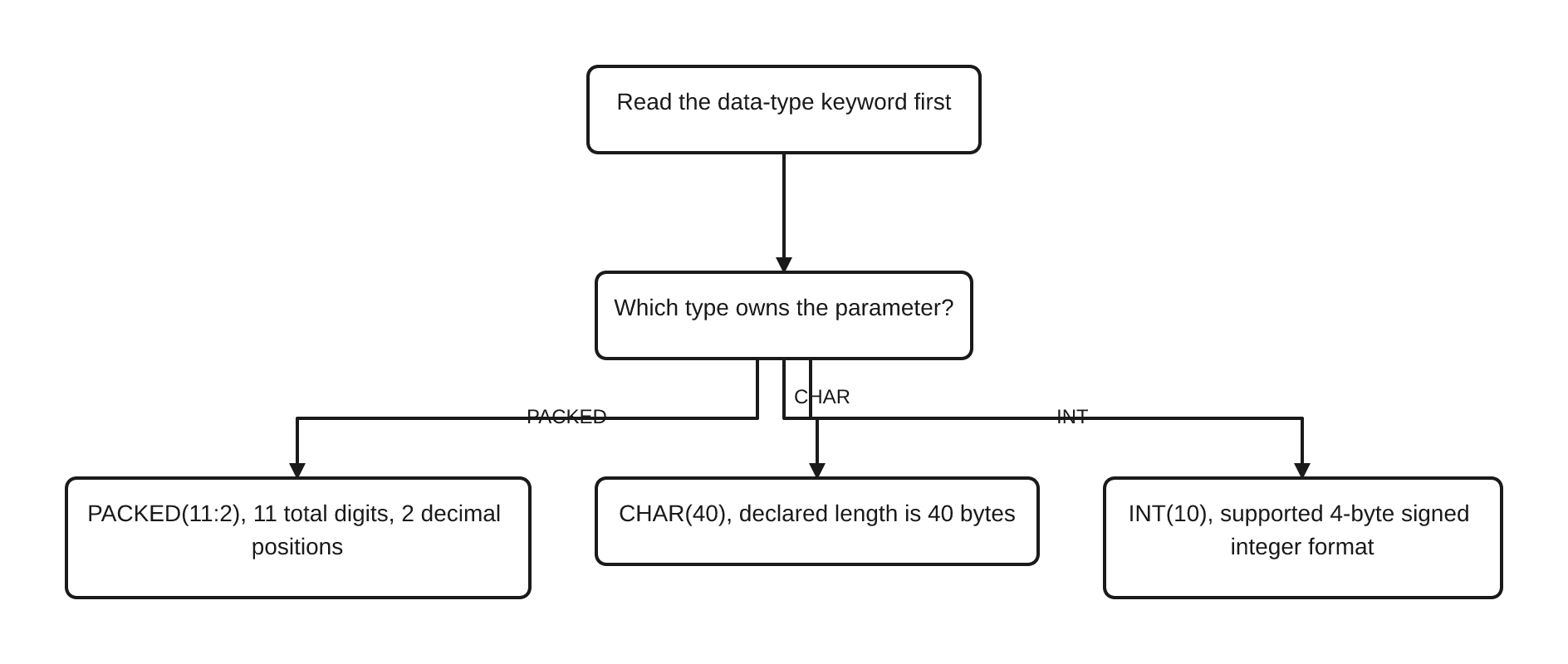
The practical lesson is simple: never interpret the parentheses before reading the keyword. If physical storage matters, verify the individual type. If the business range matters, verify the documented value range. Those are related facts, but neither can be derived safely from a generic idea of length.
Date, Time, and Timestamp
RPG provides native DATE, TIME, and TIMESTAMP types. Date and time fields have predetermined representations; they are not ordinary strings whose capacity you choose with an arbitrary number.10 11
dcl-s orderDate date      inz(D'2026-09-07');
dcl-s startTime time      inz(T'09.30.00');
dcl-s changedAt timestamp inz(Z'2026-09-07-09.30.00.000000');
dcl-s isReady   ind       inz(*on);
Those lines exactly match content/code/rpgle/article-060/date-time-indicator-declarations.rpgle. The first three variables carry temporal meaning directly. That gives the compiler and future reader a stronger contract than a character field named dateText whose validation rules exist only in comments.
RPG date fields support defined formats, with *ISO as the default internal date format when no more specific setting applies.10 A timestamp can also declare fractional-second precision. Those options matter, but a catalog of date formats, job attributes, conversion functions, time zones, and date arithmetic would hide the type-selection lesson. Consult the individual IBM pages when an interface requires a specific format.
Indicator Type
IND is the indicator data type. IBM documents indicator format as one byte holding character value 0 for off or 1 for on, with off as the default.12 In modern code you normally work with the special values *OFF and *ON rather than treating that representation as application text.
dcl-s isReady ind inz(*off);
This is a good fit for a genuine two-state condition such as ready/not ready. It does not mean every status should become an indicator: pending, approved, rejected, and cancelled form a multi-state domain and deserve a type and values that express it accurately.
For numbered indicators, operation status, display-file boundaries, and modernization guidance, use RPGLE Indicators and Status Flags. This article needs only the data-type contract.
Choosing the Right Type: Practical Guidance
The following is editorial guidance, not an IBM requirement. IBM defines what the types do; your business domain and interfaces decide which valid type is appropriate.
- Name the business value. Is it text, an exact decimal quantity, a whole number, a date/time value, or an on/off condition?
- Find the valid domain. Include negative values, fractional positions, maximum expected magnitude, and realistic growth.
- Choose the representation family. Fixed decimal and floating point solve different problems; character and temporal types carry different meaning.
- Size from the domain. For fixed decimal, count total digits and decimal positions separately. For integers, check the documented range of the selected form.
- Check existing contracts. File fields, APIs, procedure interfaces, and messages may require an exact compatible definition.
LIKEcan help reuse an authoritative RPG definition rather than copying it. - Review conversions. A valid assignment can still lose range, fractional detail, or exactness. Make every boundary intentional.
- Document the reason when it is not obvious. Explain domain constraints, not syntax the reader can already see.
Examples of reasonable starting points:
- A fixed-width customer code: evaluate
CHARwith the interface’s exact declared length. - A person’s name or message: evaluate
VARCHARwhen varying current length fits the contract. - An invoice amount with two required fractional digits: evaluate
PACKEDorZONED, sized from total range and interface representation. - A loop count that may move below zero: evaluate signed
INTand check its range. - A system-supplied non-negative sequence: evaluate
UNSonly if all boundaries support it. - A measured ratio where approximation is expected: evaluate
FLOATwith an explicit accuracy analysis. - A calendar date or event time: prefer the matching native temporal type over an unvalidated string.
- A true two-state flag: evaluate
IND, then follow the indicator article’s maintainability guidance.
Legacy Type Recognition
Older definition specifications place the name, definition type, length, internal data type, decimal positions, and keywords in fixed columns.13 The following excerpt is stored in content/code/rpgle/article-060/legacy-type-recognition.rpgle. Preserve every leading space:
     D CustomerName    S             40A
     D InvoiceAmount   S             11P 2 INZ(0)
     D LineCount       S             10I 0 INZ(0)
     D IsReady         S              1N   INZ(*OFF)
At recognition level, A maps to ordinary character format, P to packed decimal, I to signed integer, and N to indicator. The nearby length and decimal-position entries provide the attributes that modern type keywords put in parentheses:
dcl-s customerName  char(40);
dcl-s invoiceAmount packed(11:2) inz(0);
dcl-s lineCount     int(10) inz(0);
dcl-s isReady       ind inz(*off);
This small pair is not a migration algorithm. Externally described fields, data structures, overlays, arrays, and special keywords require their own analysis. Use RPGLE Specifications: Fixed, Free, and Fully Free before changing position-sensitive source.
Common Mistakes
- Calling
STATICa data type. It controls storage duration; it does not replaceCHAR,PACKED,INT, or another type. - Counting
11:2as eleven whole digits plus two fractional digits. The eleven already includes the two decimal positions. - Reading
INT(10)as arbitrary ten-digit decimal precision. It selects the documented 4-byte signed integer format. - Swapping packed and zoned because sample values look equal. The representation and interface contract still differ.
- Using floating point where exact fixed decimal is required. Approximate representation changes the contract.
- Repeating “always use packed for money.” It is common practical guidance, not a universal IBM mandate; range, scale, interfaces, and policy decide.
- Equating bytes with displayed characters in every CCSID. Character semantics need encoding context.
- Storing every date as text. Native temporal types express meaning and validation that plain text does not.
- Using unsigned solely because values happen to be positive today. Confirm that negative values are invalid and every boundary accepts unsigned data.
- Copying a numeric range from memory. Check the exact IBM page for the type and release.
- Calling IBM i a mainframe. IBM i is the operating environment on IBM Power systems; use the platform’s actual name.
FAQ
What does PACKED(11:2) mean?
It declares packed decimal with eleven total digits and two decimal positions. Nine digit positions remain to the left of the implied decimal point. The sign is not counted as one of those eleven digits.5
What is the difference between packed and zoned decimal?
Both declarations use total digits and decimal positions and represent exact fixed-decimal values. They use different data formats.5 6 Choose based on the program’s domain and the representation required by existing fields or interfaces, not on displayed appearance alone.
Why does INT(10) not hold every ten-digit signed value?
The parameter selects RPG’s 4-byte signed integer format. IBM documents its range as -2,147,483,648 through 2,147,483,647.7 The 10 is a supported digit code, not a decimal-field precision contract.
When should I use an unsigned integer?
Consider UNS when negative values are invalid by definition and all interfaces support the unsigned form. IBM explicitly describes unsigned format as the non-negative counterpart to integer format.8 Do not choose it as an assumed performance improvement.
Is floating point exact?
Not in the fixed-decimal sense used by PACKED and ZONED. RPG’s floating formats are binary floating point and should be treated as approximate.9 Use them only when that representation suits the calculation.
What is the difference between CHAR and VARCHAR?
CHAR is fixed length. VARCHAR has a declared maximum and a current value length.3 4 The correct choice depends on data and interface requirements, not just on whether the text is short or long.
Should I store a date in CHAR(10)?
Use native DATE when the value is truly a date and the interface permits it. Use character representation only when a boundary explicitly requires text, and then validate format and conversion deliberately. RPG date fields have defined date behavior rather than arbitrary string capacity.10
Is data type the same as storage type?
No. Data type describes the value’s representation and rules. In ARTICLE-059, storage type described lifetime choices such as automatic and static storage. A variable can be PACKED(11:2) whether its storage is automatic or static.
Key Takeaways
- A declaration’s type controls representation and allowable values; its scope and lifetime are separate decisions.
- Parenthesized parameters are type-specific. Read the keyword first.
- Packed and zoned definitions count total digits and decimal positions; the second count is included in the first.
- Integer arguments select supported binary formats, while floating point provides approximate rather than exact fixed-decimal representation.
- Character length needs a named unit and CCSID awareness. Temporal types have language-defined behavior rather than arbitrary string length.
- Start type selection from business meaning, range, scale, signedness, exactness, and interfaces.
- Treat practical recommendations as guidance and IBM’s documented syntax and limits as requirements.
Continue Your Learning
- Previous: RPGLE Variables and Storage Types
- Current: RPGLE Data Types, Lengths, and Precision
- Planned next: RPGLE Data Structures Explained (ARTICLE-061)
- Then planned: RPGLE Constants and Literals (ARTICLE-062)
- Return to: RPGLE for Beginners: A Practical IBM i Learning Path
ARTICLE-061 will group related fields into data structures and subfields. ARTICLE-062 will separate named constants and literals from variables. They are named as planned lessons rather than linked because no canonical published URLs have been established for them.
IBM Evidence Used
This article uses IBM i 7.4 and 7.5 ILE RPG documentation. IBM’s data-type overview and standalone-definition reference establish the supported forms and DCL-S structure.1 2 Individual packed, zoned, integer, unsigned, character, date/time, and indicator pages support the exact declaration semantics and limits stated above. The compatibility reference supports the 4- and 8-byte floating forms.9
The type-selection checklist is editorial guidance for maintainable business code. It is not presented as an IBM requirement. No IBM publication dates have been inferred, and no claim of local IBM i compilation is made.
References
IBM, “Data Types and Data Formats,” IBM i 7.5 documentation. ↩↩
IBM, “Free-Form Standalone Field Definition,” IBM i 7.5 documentation. ↩↩
IBM, “VARCHAR(length {:2 | 4}),” IBM i 7.5 documentation. ↩↩↩
IBM, “PACKED(digits {: decimal-positions}),” IBM i 7.5 documentation. ↩↩↩↩↩↩
IBM, “ZONED(digits {: decimal-positions}),” IBM i 7.5 documentation. ↩↩↩↩
IBM, “Data Type Compatibility,” IBM i 7.4 documentation. ↩↩↩↩
IBM, “Date, Time, and Timestamps,” IBM i 7.4 documentation. ↩↩
IBM, “Indicator Format,” IBM i 7.5 documentation. ↩
IBM, “Definition of Standalone Field,” IBM i 7.5 documentation. ↩
References
- Character Format — IBM
- VARCHAR(length {:2 | 4}) — IBM
- PACKED(digits {: decimal-positions}) — IBM
- ZONED(digits {: decimal-positions}) — IBM
- Integer Format — IBM
- Unsigned Format — IBM
- Data Type Compatibility — IBM
- Date Data Type — IBM
- Date, Time, and Timestamps — IBM
- Data Types and Data Formats — IBM
- Free-Form Standalone Field Definition — IBM
- Indicator Format — IBM
- Definition of Standalone Field — IBM